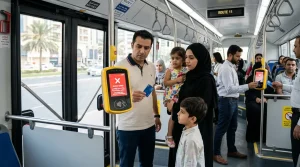
A red light and a beep-beep-beep sound mean the reader could not process the card. The most common reasons are insufficient balance, an expired card, a damaged chip, or a forgotten tap out from the previous trip.
This guide explains every possible reason for the red light, how to fix each one, and how to prevent it from happening again.
What Does the Red Light Mean?
The Hafilat bus reader has two lights:
- Green light + single beep = Card accepted. Tap successfully.
- Red light + multiple beeps = Card rejected. Tap failed.
The red light means the card can’t be used for that trip. The passenger must fix the issue before boarding.
What the red light does NOT mean:
- The card is permanently broken.
- The passenger owes money to the transport authority.
- A fine has been issued.
- The card needs to be thrown away.
The red light is a temporary problem. Almost every cause has a simple fix.
Five Reasons for the Red Light (And How to Fix Each One)
Reason 1: Insufficient Balance
Most common cause.
The Hafilat system requires a minimum balance of AED 10 to board a bus. This is not the fare. It is a buffer to ensure the passenger can complete their journey even if they travel a longer distance than expected.
If the balance is below AED 10, the reader shows a red light and rejects the tap.
How to check:
Tap the card on any Ticket Vending Machine (TVM). Select “Balance Inquiry.” The screen shows the exact balance.
How to fix:
Add credit using one of these methods:
| Method | Processing Time | Where |
| Ticket Vending Machine | Instant | Any bus station |
| Lulu Hypermarket counter | Instant | Customer service desk |
| Customer Happiness Center | Instant | Major bus stations |
| Darb app | 1-2 hours | Smartphone |
| Payit app | 1-2 hours | Smartphone |
Prevention:
Keep at least AED 20 on the card at all times. Check the balance once a week. Set up auto-recharge in the Darb app.
Reason 2: Card Expired
Common for old cards.
Hafilat cards do not last forever. Each card type has a different validity period.
| Card Type | Validity |
| Anonymous Card | 16 years |
| Personalized Card | 16 years |
| Student Card | 5 years |
| Senior Citizen Card | 1 year (renewable) |
| People of Determination Card | 1 year (renewable) |
| Temporary Card (CST) | 30 days |
If the card has passed its expiry date, the reader will show a red light.
How to check expiry date:
- TVM method: Tap the card on any TVM. Select “Card Details.” The expiry date appears on screen.
- Darb app method (personalized cards only): Open the app. Go to “My Cards.” The expiry date is listed.
- Customer service method: Visit any Customer Happiness Center. Staff can check the expiry date.
How to fix:
| Card Type | Fix |
| Anonymous (expired) | Buy a new card for AED 10. Balance from old card cannot be transferred. |
| Personalized (expired) | Visit a Customer Happiness Center with Emirates ID. New card issued. Balance and history transfer automatically. |
| Student (expired) | Get a new student verification letter. Visit the Customer Happiness Center. Pay AED 5 for a new card. |
| Senior / POD (expired) | Visit the Customer Happiness Center with Emirates ID and updated documents. Renewal is free. |
| Temporary (expired) | Cannot renew. Buy a new temporary card for free from any TVM. |
Prevention:
Check the expiry date once every six months. For senior and POD cards, set a calendar reminder 30 days before the renewal date.
Reason 3: Damaged Card
The chip is not readable.
Hafilat cards use NFC (Near Field Communication) technology. The chip inside the card communicates with the reader. If the chip is damaged, the reader cannot read it.
Common causes of damage:
- The card is bent or folded.
- The card is cracked.
- The card has been exposed to extreme heat (left in a car on a summer day).
- The card has been stored next to a phone or a magnet for a long time.
- The printed surface is scratched off, damaging the antenna.
How to check if the card is damaged:
Try the card on a different reader. If it fails on two or three different readers, the card is likely damaged.
How to fix:
| Card Type | Fix | Cost |
| Anonymous | Buy a new card. Balance cannot be recovered unless linked to an Emirates ID. | AED 10 |
| Personalized | Visit the Customer Happiness Center with your Emirates ID and a damaged card. Balance transfers to new card. | AED 5 |
| Student | Visit the Customer Happiness Center with your Emirates ID and damaged card. | AED 5 |
| Senior / POD | Visit the Customer Happiness Center with your Emirates ID and damaged card. | Free |
Prevention:
Store the card in a wallet or cardholder. Do not bend it. Keep it away from phones, magnets, and direct sunlight.
Reason 4: Forgot to Tap Out on Previous Trip
If you forgot to tap out on the previous trip, then your previous journey was incomplete.
The Hafilat system expects a tap in and a tap out for every trip. If a passenger forgets to tap out, the system still registers an incomplete journey. On the next trip, some readers may show an error or require an extra tap.
How to check:
Tap the card on any TVM and check the transaction history. If the last trip shows no exit time, the passenger forgot to tap out.
How to fix:
- Tap the card on any TVM. This often clears the pending status.
- Tap the card on the bus reader a second time.
- Add AED 10 to the card. The system resets.
Prevention:
Always tap out when getting off the bus. Listen for the beep. Watch the screen to confirm.
Reason 5: Reader Malfunction
Sometimes the machine is the problem.
Bus readers can malfunction. The screen may be blank, the light may be off, or the reader may simply not respond.
How to check:
Look at other passengers. If multiple people are struggling with the same reader, the reader is likely broken.
How to fix:
- Try a different reader on the same bus (some buses have two readers near the front and middle doors).
- Wait for the next bus.
- Tell the driver. They may know the reader is broken.
If charged incorrectly due to a broken reader:
Visit a Customer Happiness Center. Bring the card. Explain what happened. Staff can review the transaction and issue a refund if the reader was reported broken.
Troubleshooting Flowchart
Follow these steps in order when the red light appears.
Step 1: Check the balance
Tap the card on any TVM. Is the balance below AED 10?
- Yes → Add credit. Problem solved.
- No → Go to Step 2.
Step 2: Check the expiry date
Tap the card on any TVM and select “Card Details.” Is the card expired?
- Yes → Renew or replace the card.
- No → Go to Step 3.
Step 3: Try a different reader
Use a different reader on the same bus or a different bus. Does it work?
- Yes → The first reader was faulty. No further action needed.
- No → Go to Step 4.
Step 4: Check for damage
Inspect the card. Is it bent, cracked, or scratched?
- Yes → Replace the card at a Customer Happiness Center.
- No → Go to Step 5.
Step 5: Check transaction history
Tap the card on a TVM and view the last trip. Was there a tap out recorded?
- No → The previous trip was incomplete. Tap the card on a TVM to clear the pending status.
- Yes → Go to Step 6.
Step 6: Visit a Customer Happiness Center
If none of the above steps work, the card may have an internal issue that requires staff assistance. Bring the card and Emirates ID (if personalized) to any Customer Happiness Center.
Real User Experience (From Reddit)
A Reddit user shared this experience with a rejected card:
“The card was tapped on the bus. Red light. Beep beep beep. Embarrassing. Everyone was waiting. Stepped off and tried again. Same result. Walked to a TVM at the station. Checked the balance. It was AED 2. The balance was too low. Added AED 20. Tapped on the next bus. Green light. Problem solved.”
Another user shared:
“The card was working fine yesterday. Today, red light. Checked the balance. AED 15. Enough money. Tried another reader. Same red light. Went to a Customer Happiness Center. The staff said the card had expired. Did not even know cards could expire. Paid AED 5 for a replacement. New card worked immediately.”
These stories show that the red light is almost always fixable with a simple action: add credit, replace an expired card, or tap a different reader. If you are tapping for someone else, that will also trigger a red light.
Prevention Tips
Tip 1: Keep balance above AED 5
A red light often means a low balance. So always check your Hafilat card balance; do not wait until the balance drops to AED 5. Recharge when the balance falls below AED 20. This provides a buffer for unexpected long trips or forgotten tap-outs.
Tip 2: Check expiry date every six months
For anonymous and personalized cards, set a calendar reminder every six months to check the expiry date. For student, senior, and POD cards, check every three months.
Tip 3: Store the card properly
Keep the card in a wallet or cardholder. Do not bend it. Do not leave it in a hot car. Keep it away from phones and magnets.
Tip 4: Set up auto-recharge
In the Darb app, enable auto-recharge. The app adds credit automatically when the balance drops below a set amount. This prevents insufficient balance issues.
Tip 5: Listen for the beep
Every time the card is tapped, listen for the confirmation beep. If no beep is heard, tap again. Do not walk away until the beep is heard.
Part 7: Final Answer
A red light on the bus reader is not a disaster. It is a signal that something needs attention.
- Check the balance first. Low balance is the most common cause.
- Check the expiry date next. Old cards stop working.
- Inspect the card for damage. A bent or cracked card will not read.
- Try a different reader. Occasionally, the machine is the problem.
- Visit a Customer Happiness Center if nothing else works.
A TVM check and a recharge or replacement usually resolve most red light issues in under two minutes.
And next time? Keep AED 20 on the card. Check the expiry date every six months. Store the card away from phones and magnets. Listen for the beep.
Safe travels.