No. A fine will not be issued for forgetting to tap out once. The system will charge the maximum fare for that route, but no penalty will be added to the card.
This guide explains exactly what happens, how much will be charged, how to fix it in under a minute, and how to prevent it from happening again.
What Happens When You Forget to Tap Out?
The Hafilat system calculates fares based on distance traveled. It needs two points of data to determine the correct fare.
- Tap in: The system records the boarding point.
- Tap out: The system records the exit point.
- Fare calculation: Distance between both points multiplied by the per-kilometer rate.
When a passenger forgets to tap out, the system has only one data point. It does not know where they got off. So it assumes they traveled the entire route from the first stop to the last stop.
The result: the passenger is charged the maximum possible fare for that bus route.
Example 1:
1 City Bus: A passenger boards Bus 24 at Marina Mall and rides to the Grand Mosque. The actual distance is short. The correct fare is about AED 2.50.
But they forget to tap out. The system does not know they got off early. It assumes they rode from Marina Mall all the way to the final stop. They are charged AED 5 – the maximum fare for city buses.
They paid double what they should have. No fine. No blocked card.
Example 2:
Intercity Bus: A passenger boards the E100 bus in Abu Dhabi heading to Dubai. The correct fare for this trip is AED 25.
They forget to tap out when they arrive at Al Ghubaiba station in Dubai. The system does not know they got off. It assumes they rode to the end of the line. They are charged the full route fare again, another AED 25.
They paid double. On an intercity route, that is a much bigger loss.
Example 3:
Airport Bus: The A1 airport bus has a flat fare of AED 4 regardless of distance. Forgetting to tap out on the A1 does not change the fare. The passenger is still charged AED 4. No penalty.
Will You Get a Fine?
No. Not for a first-time mistake. Not for an honest, forgetful moment.
The Hafilat system does not automatically issue fines for missed tap-outs. It simply charges the maximum fare and moves on. No record is kept. No SMS is sent. No card is blocked.
When are fines actually issued?
Fines are issued for intentional violations, not honest mistakes. Examples include:
| Violation | Typical Fine Range |
| Traveling without tapping in at all | AED 200+ |
| Using someone else’s student or senior pass | AED 200+ |
| Damaging the card to avoid payment | AED 200+ |
| Repeatedly “forgetting” to tap out to avoid correct fares | AED 200+ (after multiple offenses) |
| Boarding with insufficient balance multiple times | Card may be blocked |
A single forgotten tap out is not on this list. The passenger simply pays the maximum fare for that trip. No fine. No warning. No escalation.
What about repeat offenders?
If a passenger consistently “forgets” to tap out on every trip, the system may flag their card. Inspectors may also notice the pattern. Repeatedly forgetting to tap out can lead to fines.
But what about someone who forgets only once every few months? No action is taken.
How Much Will Be Charged?
The amount depends on the type of bus and the route length.
| Bus Type | Normal Fare Range | Maximum Fare (Forgot to Tap Out) |
| City Bus (within Abu Dhabi) | AED 2.00 – 3.00 | AED 5.00 |
| Regional Bus (suburbs to city) | AED 3.00 – 4.00 | AED 5.00 |
| Express Intercity (Abu Dhabi to Al Ain) | AED 10.00 – 15.00 | Full route fare (~AED 25) |
| Express Intercity (Abu Dhabi to Dubai) | AED 25.00 | Full route fare (~AED 25) |
| A1 Airport Bus | AED 4.00 (flat) | AED 4.00 (no change) |
| Night Bus (N41, N43) | AED 2.00 – 5.00 | AED 5.00 |
Key takeaways:
- For city and regional buses, the maximum is capped at AED 5. The most a passenger can lose from one forgotten tap out is AED 5.
- For express intercity routes, there is no cap. The passenger could pay double the correct fare.
- For the A1 airport bus, forgetting to tap out has no financial consequence because the fare is flat.
Real cost example
City bus commuter: A passenger takes two city buses every day (to work and back home). That is 60 trips per month.
If they forget to tap out once per month, they lose an extra AED 2.50 on that trip (AED 5 charged instead of AED 2.50). That is AED 2.50 per month, less than the price of a bottle of water.
If they forget to tap out once per week, they lose about AED 10 per month.
The financial impact is small for city bus users. The real loss is on intercity routes.
How to Check If You Were Overcharged
A passenger who thinks they forgot to tap out can check the charge amount using one of these methods.
Method 1: Ticket Vending Machine (Fastest – 30 seconds)
- Find any TVM at a bus station.
- Tap the card on the reader.
- Select “Transaction History” or “Last Trip.”
- The screen shows the amount deducted from the last journey.
This method works for all card types – anonymous, personalized, student, senior, and POD.
Method 2: Darb App (For Personalized Cards Only)
- Open the Darb app.
- Log in to the account.
- Go to “Transaction History.”
- See every trip and the fare charged.
This method works only for personalized cards linked to an online account. Anonymous card holders cannot use this method.
Method 3: Bus Reader (Next Time You Board)
- Tap the card when boarding the next bus.
- The screen briefly flashes the remaining balance (about 2-3 seconds).
- If the balance looks lower than expected, the maximum fare was charged on the previous trip.
This method is quick but less precise. The passenger needs to remember their previous balance to compare.
Method 4: Customer Happiness Center (For Disputes)
If the passenger believes they were charged incorrectly and the other methods do not resolve the issue, they can visit any Customer Happiness Center. Staff can pull up the full transaction history and explain exactly what happened.
What to look for on the screen:
- City bus normal fare: AED 2.00 – 3.00
- City bus maximum fare: AED 5.00
If AED 5.00 appears for a short trip (less than 15 minutes), the passenger forgot to tap out.
How to Fix It (Step by Step)
The process takes less than one minute. No phone calls. No customer service visits. No forms to fill out.
Step 1: Check the Hafilat card balance
Check the Hafilat card balance. Tap the card on any TVM or bus reader. See how much is left.
Step 2: Add credit if needed
If the balance is low or negative, add AED 10 or more. Options include:
| Recharge Method | Processing Time | Best For |
| Ticket Vending Machine | Instant | Urgent travel, immediate fix |
| Lulu Hypermarket counter | Instant | While shopping |
| Customer Happiness Center | Instant | Also need other help |
| Darb app | 1-2 hours | Planning ahead |
| Payit app | 1-2 hours | Already using Payit |
Step 3: Tap normally on the next trip
That is it. The system resets. The next trip will charge the correct fare based on where the passenger boards and gets off.
What if the balance shows a negative?
Example: A passenger had AED 3 on their card. They forgot to tap out. The system charged AED 5. The balance now shows -2 AED.
Fix: Add AED 10 or more. The negative amount will be deducted automatically from the top-up. The card will work again immediately. No extra steps.
What if the balance is positive but low?
Example: A passenger had AED 6 on their card. They forgot to tap out. The system charged AED 5. The balance now shows AED 1. Not negative, but very low.
Fix: Add AED 10 to be safe. The card will have AED 11 for future trips.
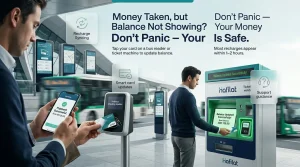
Sometimes a negative balance happens because an online recharge never synced.
Real User Experience (From Reddit)
A Reddit user shared this exact situation in a post about Hafilat’s negative balance.
“The card was tapped on the bus, and the screen showed -0.95 AED. Panic set in. The thought was that the card was broken or money was owed. Two recharges were made, online and at a supermarket, but the balance still did not change.”
“Someone suggested just tapping the card on any machine. A TVM at the bus station was used. The card was tapped, and the balance updated instantly. All that worry for nothing.”
Another Reddit user commented:
“The same thing happened. A recharge was done online. Money was taken from the bank account. But the balance on the card did not show the new credit. Hours passed. Panic set in. Then a friend said to tap the card on a bus reader. One beep. Balance updated. Problem solved.”
These stories highlight two key points:
- Negative balance and pending recharges look scary but are almost always temporary.
- One physical tap on any reader solves both problems instantly.
What If the Reader Were Broken?
Occasionally, it is not the passenger’s fault. The reader may be broken or unresponsive.
Signs of a broken reader:
- The card is tapped. No beep. No light. No change on screen.
- The card is tapped again. Same result.
- Other passengers are also struggling with the same reader.
- The screen is blank or shows an error message.
What to do:
- Try a different reader. Some buses have two readers near the front and middle doors. Try the other one.
- Tell the driver. The driver may know the reader is broken and can note it in their log.
- Take a photo. Take a picture of the reader showing no response or an error message. This serves as evidence if a dispute is needed later.
- Tap out on the next bus. When boarding the next bus, tap out as soon as you board. The system will register the exit point from the previous bus.
If a maximum fare is charged due to a broken reader:
Visit any Customer Happiness Center. Bring the card and explain what happened. Bring the photo if available. Staff can review the transaction and refund the difference if they confirm the reader was faulty.
Refund process:
- Staff reviews the transaction timestamp.
- They check the bus number and route.
- If the reader reported broken that day, the refund was approved.
- The difference is added to the card balance within 24 hours.
Refunds are not automatic. The passenger must visit a Customer Happiness Center in person. But for a broken reader, the process is straightforward.
If the reader is not the problem, the issue might be your card itself. We explain why your card might show a red light and how to fix it.
How to Avoid Forgetting to Tap Out
Prevention is better than overpaying. These six habits work for regular commuters.
Habit 1: Tap as you step off
Do not wait. Do not walk and tap. Do not hold a phone in one hand and the card in the other. As soon as a foot touches the ground, tap the reader. Make it part of the exit routine.
Habit 2: Watch the screen
After tapping out, the reader screen shows the remaining balance for a few seconds. Look at it. That confirms the tap worked.
Habit 3: Listen for the beep
No beep means no tap. If the beep is not heard, tap again. Do not walk away until the beep is heard.
Habit 4: Keep enough balance
If the balance is very low, the system might still allow boarding, but then struggle to deduct the fare. Keep at least AED 10 on the card at all times. That way, even if a tap-out is forgotten, the balance will not go negative, and also, sharing a card with someone else can cause tapping problems. So avoid it.
Habit 5: Set a phone reminder
For regular commuters, set a daily reminder on their phone for the bus’s usual arrival time. Something simple: “Tap out of the bus.” After a few weeks, it becomes automatic.
Habit 6: Use the Darb app for personalized cards
The Darb app sends push notifications for low balance and trip history. Checking the app once a day helps catch missed tap-outs early.
Final Answer
Forgetting to tap out feels worse than it is. A red light or a negative number appears. Panic sets in. The mind immediately conjures up the worst possible scenarios: a fine, a blocked card, or a trip to a customer service center.
But the reality is simple. An extra AED 2 or AED 3 was paid for that trip. That is all.
- No fine.
- No blocked card.
- No visit to a customer service center.
- No record on the account.
- No phone call to ITC.
Just add credit, tap normally next time, and move on.
And next time? Tap as you step off. Listen for the beep. Keep AED 10 on the card.
Safe travels.