6 Ways to Recharge
Hafilat Card Online & Offline
Full Guide β Step by Step
You check your Hafilat balance and find yourself running low on credit. Happens to everyone. The good news is that there are six ways for Hafilat Recharge Check: online through the Darb portal, using the Darb mobile app, through the Payit app, at Ticket Vending Machines (TVM) at bus stations, at Customer Happiness Centers, or while shopping at retail outlets like Lulu, SPAR, or Co-op.
Each method is explained step-by-step below. Some show the balance right away. Others take a bit longer. Pick whatever works best at the moment.
Step-by-Step
6 Recharge Methods; Full Guide
Every method explained in detail. Pick what suits your situation right now.
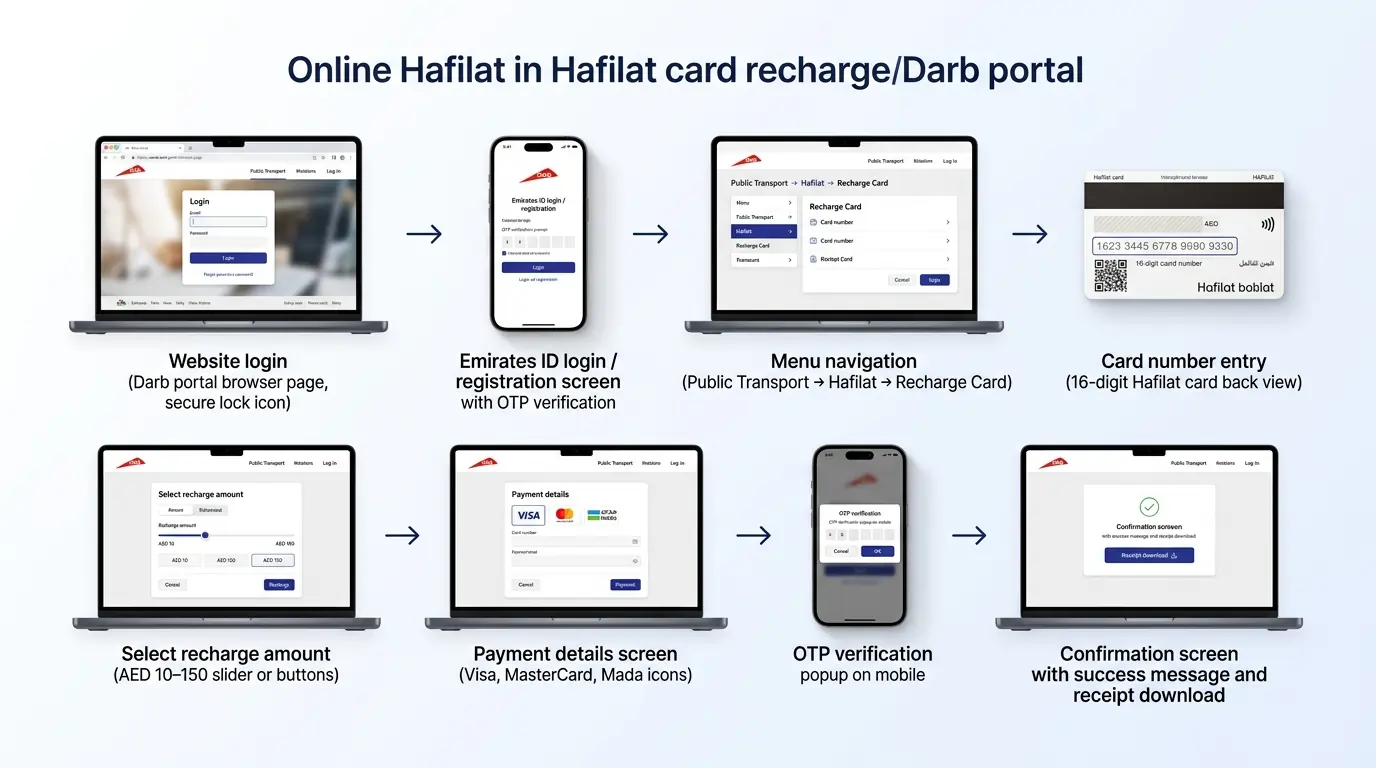
Recharge via Darb Online Portal
Go to the site
Type hafilat.darb.ae into the browser. That’s the official Darb website. Before putting any card numbers in, check for the padlock icon up in the address bar. That little lock means the site is safe.
Get logged in
Already signed up? Put in your Emirates ID and password. New around here? Click Register. They’ll ask for an Emirates ID, an email, and a mobile number. An OTP code will come to your phone. Enter it, and you’re in.
Find the recharge spot
Once inside, look at the top left corner. There’s a menu button (three lines). Click it. Then: Pick Public Transport β PickΒ Hafilat cards
β Pick Recharge Card. Don’t overthink it. This is the right place, even though it says “Recharge.”
Enter the card number
Flip the Hafilat card. On the back is a 16-digit number. Type it in exactly as it’s printed. No extra spaces.
Choose how much to add
Pick an amount. The site lets you choose between AED 10 and AED 150 per go. Adding a larger amount means fewer times you have to come back and do this again.
Put in payment details
Fill out the payment form. Works with:
Need the card number, expiry date, CVV, and billing address.
Check the phone for OTP
The bank will send a one-time password to the mobile number linked to the card. Type that code in when asked.
Hit confirm
Look over everything. Card number. Amount. Any fees. Then click Confirm. A message pops up saying it went through. But the balance won’t show on the card right away. Give it 10 to 15 minutes. Save the PDF receipt or take a screenshot. Past recharges are under Transaction History.
A few things to remember
- Keep that 16-digit number written down somewhere. Don’t post it online.
- Remember that any balance you add is valid for only 3 months from the recharge date.
- Only use the official Darb site. That padlock icon is the sign.
- No update after two days? Call 800 850.
Recharge via Darb Mobile App
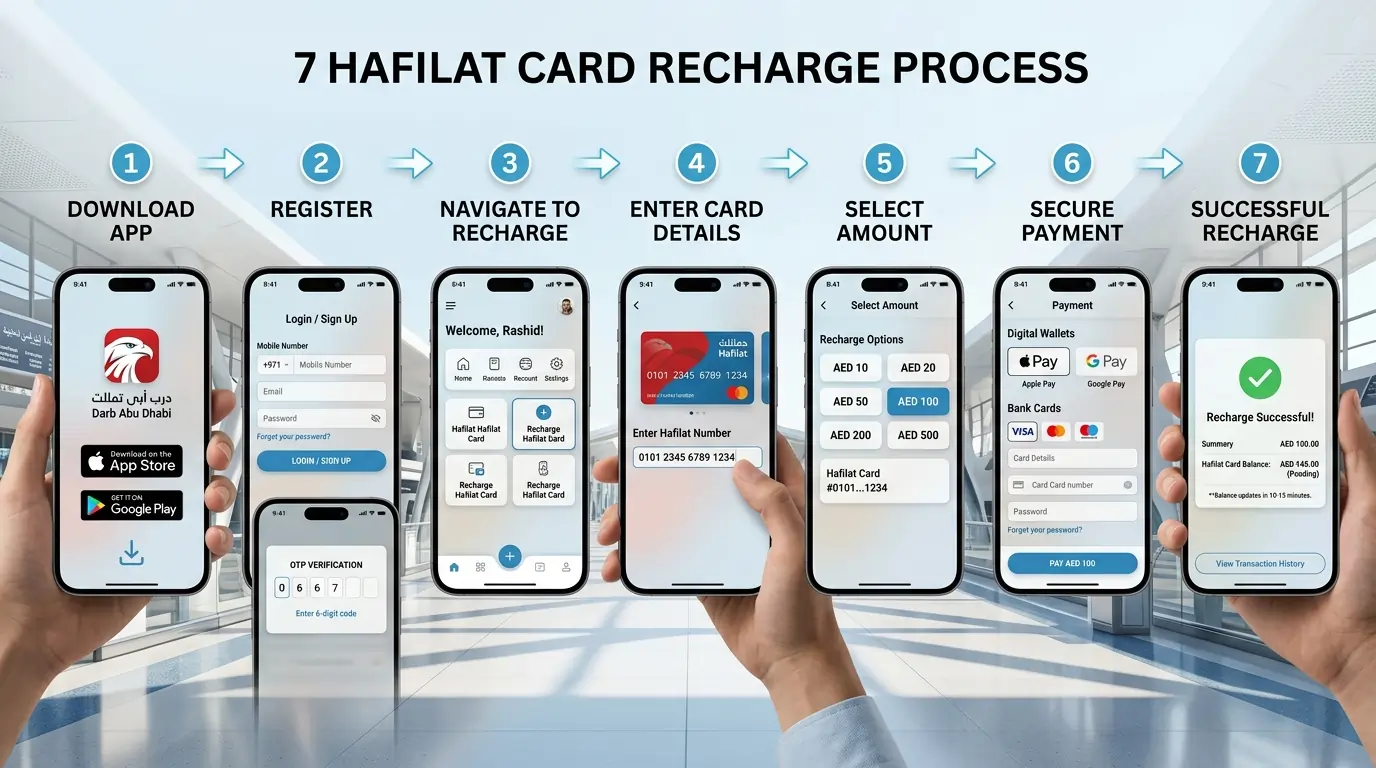
Get the app first
iPhone: App Store, search “Darb Abu Dhabi,” hit Get. Android: Google Play Store, same search, and tap Install. Look for the official Darb logo.
Log in or sign up
Open the app. Used it before? Just log in. New? Tap Sign Up. Enter your mobile number and email. Pick a password. An OTP comes by text. Type it in.
Find a recharge
On the home screen, look at the bottom. Tap the plus (+) icon. Select “Recharge Hafilat Card.”
Add your card
Flip the Hafilat card. Type the 16-digit number from the back. Exactly as shown. Tap Add Card. The app saves it.
Pick an amount
Choose between AED 10 and AED 500.Β Tap the amount.
Pay
Follow the payment steps. Use a saved card or wallet.
After payment
The app says it worked. But the balance takes 10 to 15Β minutesΒ to show up. Check the transaction history to see if it’s processing.
- Stay logged in. Faster next time.
- Turn on auto-recharge in settings. Adds money automatically when the balance runs low.
- Save a card once. No need to retype every time.
- You cannot have more than AED 150 on the card at once, but you can add up to AED 500 online, as long as the card balance after adding does not exceed AED 150.
- The app also shows balance, expiry, and trip history.
- The maximum balance your card can hold at any time is AED 150. Therefore, even though the app allows you to select up to AED 500, the system will reject any recharge that would make your total balance exceed AED 150. For a completely empty card, the most you can add is AED 150.
Recharge via Payit App
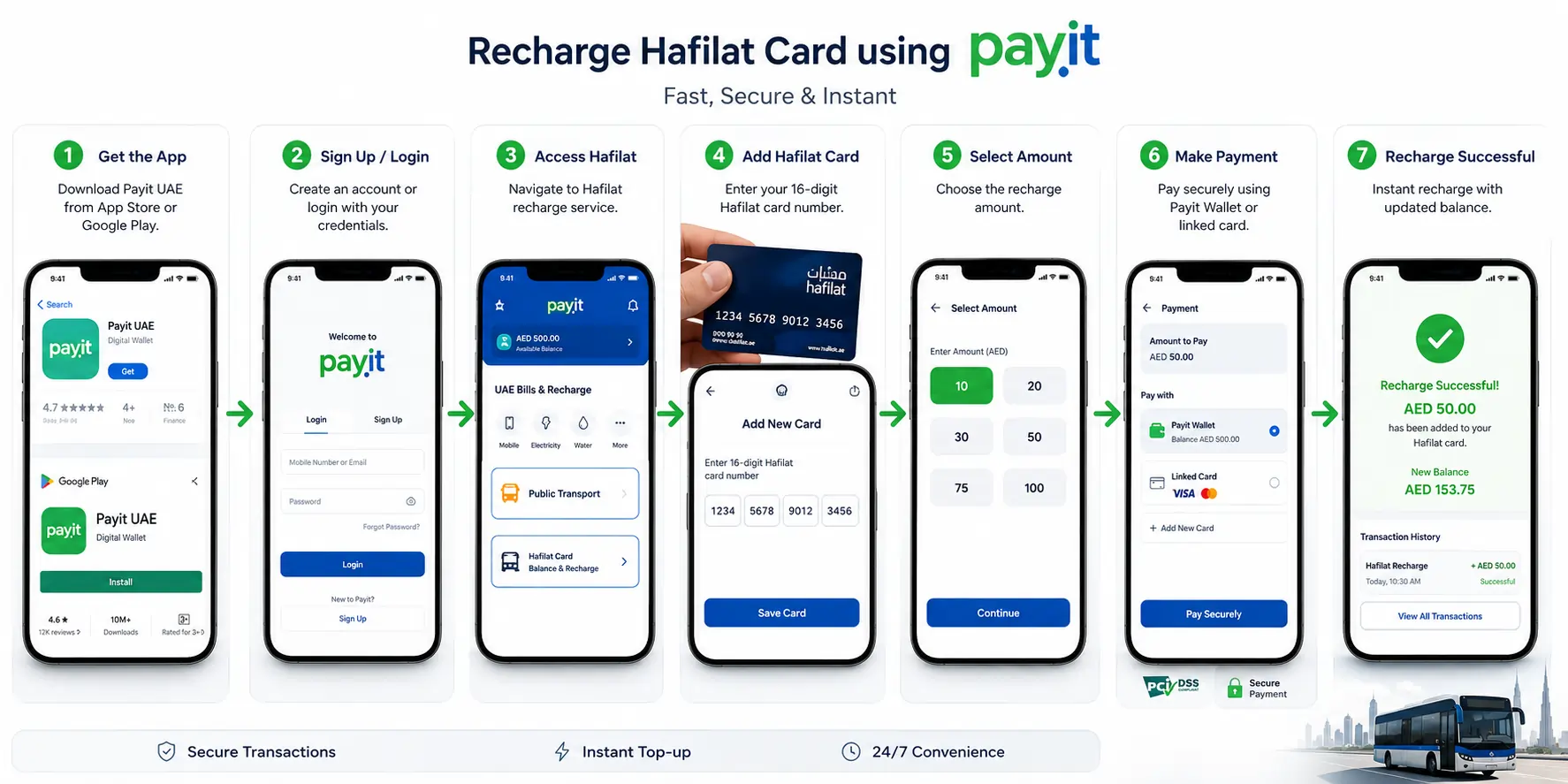
Get the app
iPhone: App Store, search “Payit UAE,” hit Get. Android: Google Play Store, search “Payit Digital Wallet UAE,” and tap Install. Get the latest version. Older ones might not have the Hafilat option.
Log in or sign up
Open the app. Been here before? Just log in. New? Tap Sign Up. Enter your mobile number and email. Make a password. An OTP comes by text. Type it in.
Find Hafilat
On the home screen, tap “UAE Bills & Recharge.” Then “Public Transport.” Then “Hafilat Card Balance & Recharge.” That’s where it lives.
Add your card
First time? Tap “Add New Card.” Flip the Hafilat card. Type the 16-digit number on the back. Tap Save. The app remembers it.
Pick an amount
Choose between AED 10 and AED 100. Tap the amount.
Pay
Finish payment using Payit wallet or a linked card.
After payment
The app says it worked. The recharge is processed instantly, and the balance should be available on your Hafilat card right away. Check the Payit transaction history to see if it’s going through.
π‘
- Give the card a nickname when adding. Easier to find later.
- Stay logged in. Faster next time.
- Already using Payit for DEWA or Du? Hafilat fits right in.
- Payit also handles Hafilat fines if any come up.
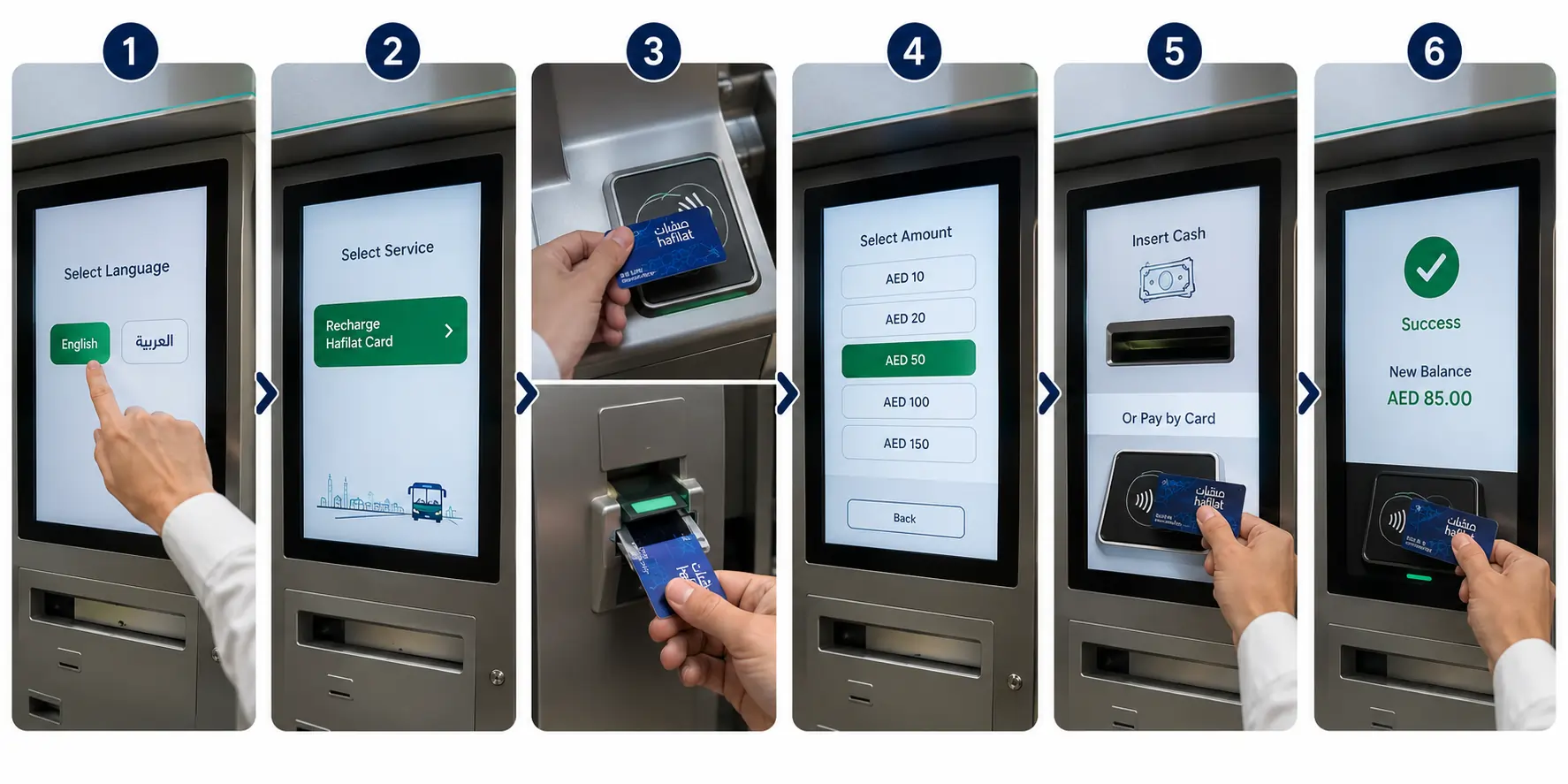
Recharge at Ticket Vending Machines
π Where to find them
Most bus stations have these. Abu Dhabi Central, Al Ain Terminal, Mussafah, Khalifa City, and Al Wahda Mall. Look near the entrance or where buses line up.
β‘ Why use this method
Balance shows up right away. No waiting. Can print a receipt too.
How to do it
Tap the screen
Pick English or Arabic.
Choose Recharge
Choose “Recharge Hafilat Card.”
Tap or insert card
Some machines take a tap. Some want the card in a slot.
Pick an amount
AED 10 to AED 150 usually.
Pay
Pay with cash or card.
Tap card again
The new balance shows on screen.
- Wait for the beep before pulling the card away.
- No internet needed.
- Screen not working? Find another machine or hit the Help button.
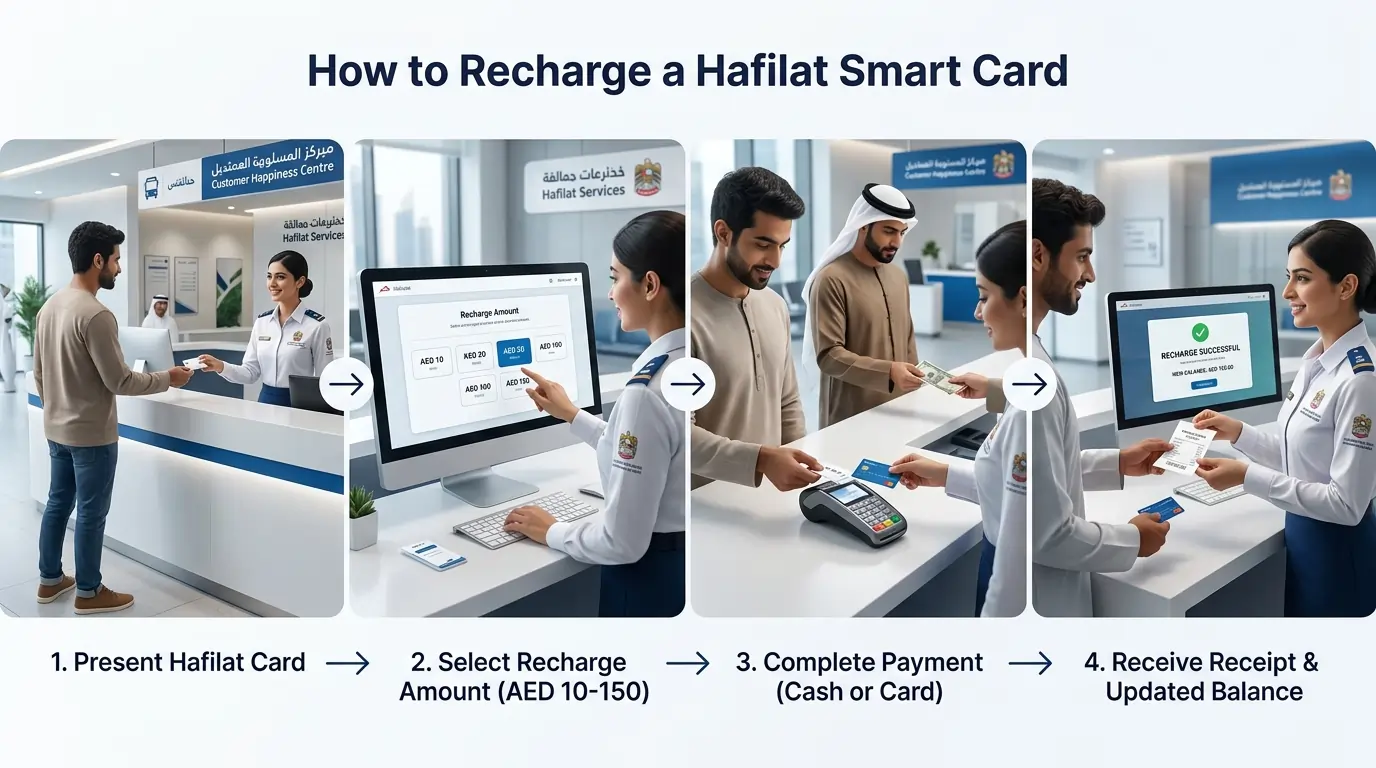
Recharge at Customer Happiness Centers
π Where to go
These are the official ITC counters. Found at:
- Abu Dhabi Main Bus Station
- Baniyas Bus Station
- Mussafah Bus Station
- Shahama Bus Station
- Al Ain Bus Station
β‘ Why go here
Balance shows up immediately. No waiting days. Also good for lost cards or wrong balances. They can fix things.
How to do it
Go to the counter
Hand over the card.
Say how much to add
AED 10 to AED 150.
Pay
Pay with cash or card.
Get a receipt
Balance shows up right away.
- Bring the actual card. Not just the number.
- Personalized card? Bring the Emirates ID too.
- Only Personalised cards can be purchased/recharged at Customer Happiness Centers.
- Go in the morning. Evenings are packed.
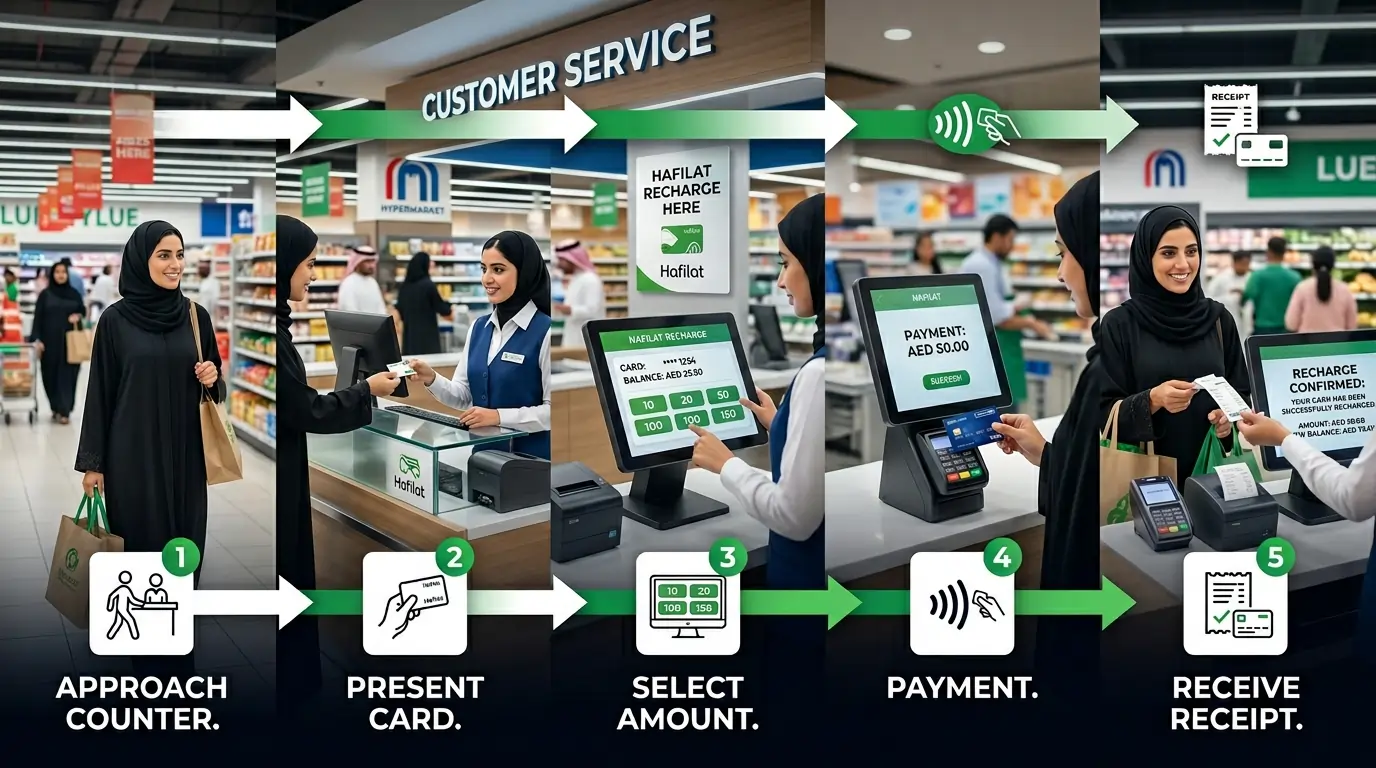
Recharge at Retail Outlets
Where to go
These stores offer Hafilat recharge:
- Lulu Hypermarket and Lulu Exchange
- SPAR
- Co-op
- ADNOC stations
- Not every branch has it. The bigger ones usually do.
What happens after
The balance takes up to 2 hoursΒ to show up. Not as fast as TVM or customer centers, but fine if not in a rush.
How to do it
Go to the counter
Go to the customer service counter.
Hand over the card
Hand over the Hafilat card.
Say how much
AED 10 to AED 150 usually.
Pay
Pay with cash or card.
Get a receipt
Keep it until the balance shows up.
- Bring the physical card. They can’t look it up by number.
- Personalized card? Bring the Emirates ID too. Some stores ask for it.
- Combine with grocery shopping. Two tasks in one trip.
Banknote Reloader Machines
What are they?
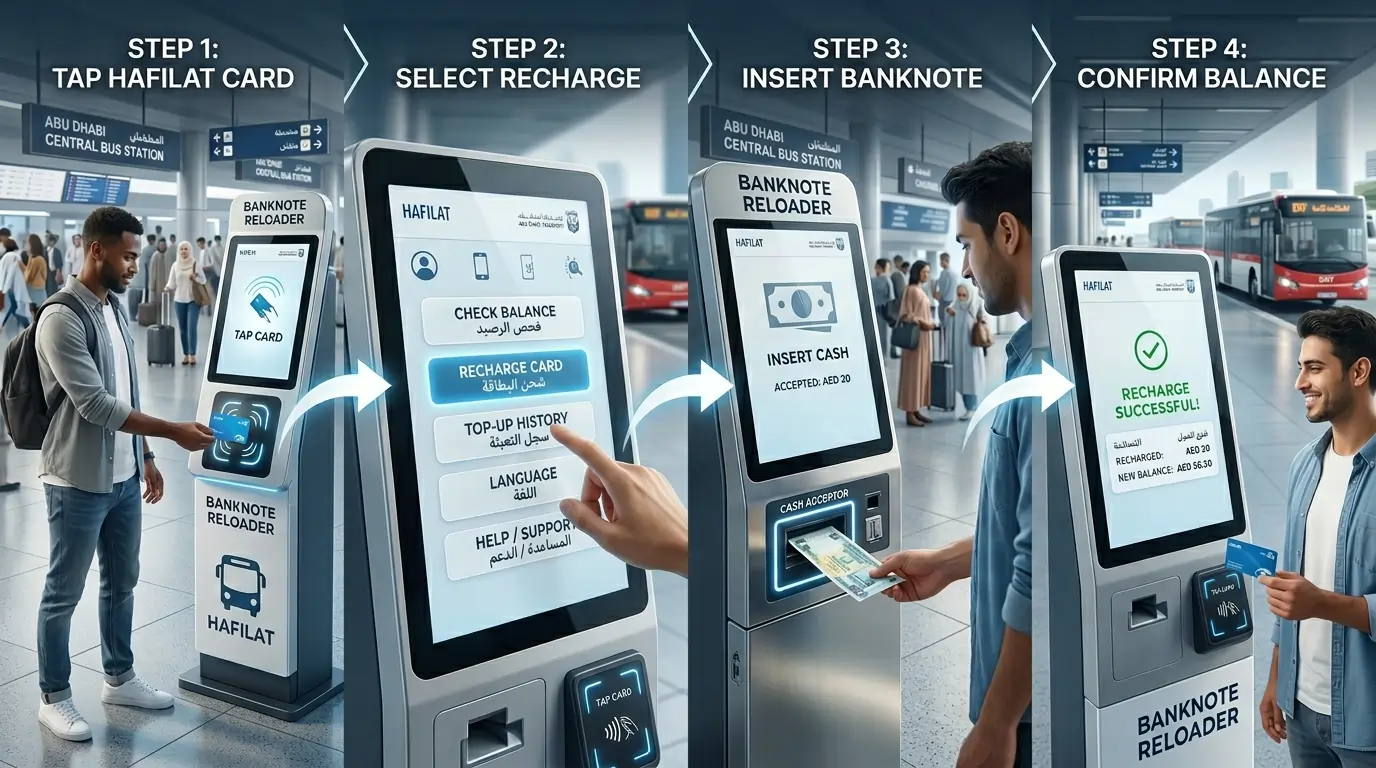
These are small machines that only take cash. No cards. No internet. Just insert money and go. They’re called BR machines or banknote reloaders.They are also known as Swift Reloader Machines.
π Where to find them
- Air-conditioned bus shelters
- Shopping malls
- Hospitals
- Some bus stations
How to do it
Tap card on reader
Tap the Hafilat card on the reader.
Select Recharge Card
Select “Recharge Card.”
Insert cash
Insert the exact cash amount. The machine doesn’t give change.
Wait for confirmation
Wait for confirmation. The balance shows up right away.
β What’s good about it
- Balance shows up immediately.
- Works 24/7.
- No internet or card needed.
- Just cash.
β οΈ What’s not so good
- Cash only. No cards.
- No change given. Need the exact amount.
- Can’t buy new cards or passes here. Recharge only.
- Sometimes out of service if the cash compartment is full.
- Carry small bills. AED 10, 20, and 50 work best.
- Check the screen before inserting cash. Some machines show which bills they accept.
- If it doesn’t work, find another one or use a TVM instead.
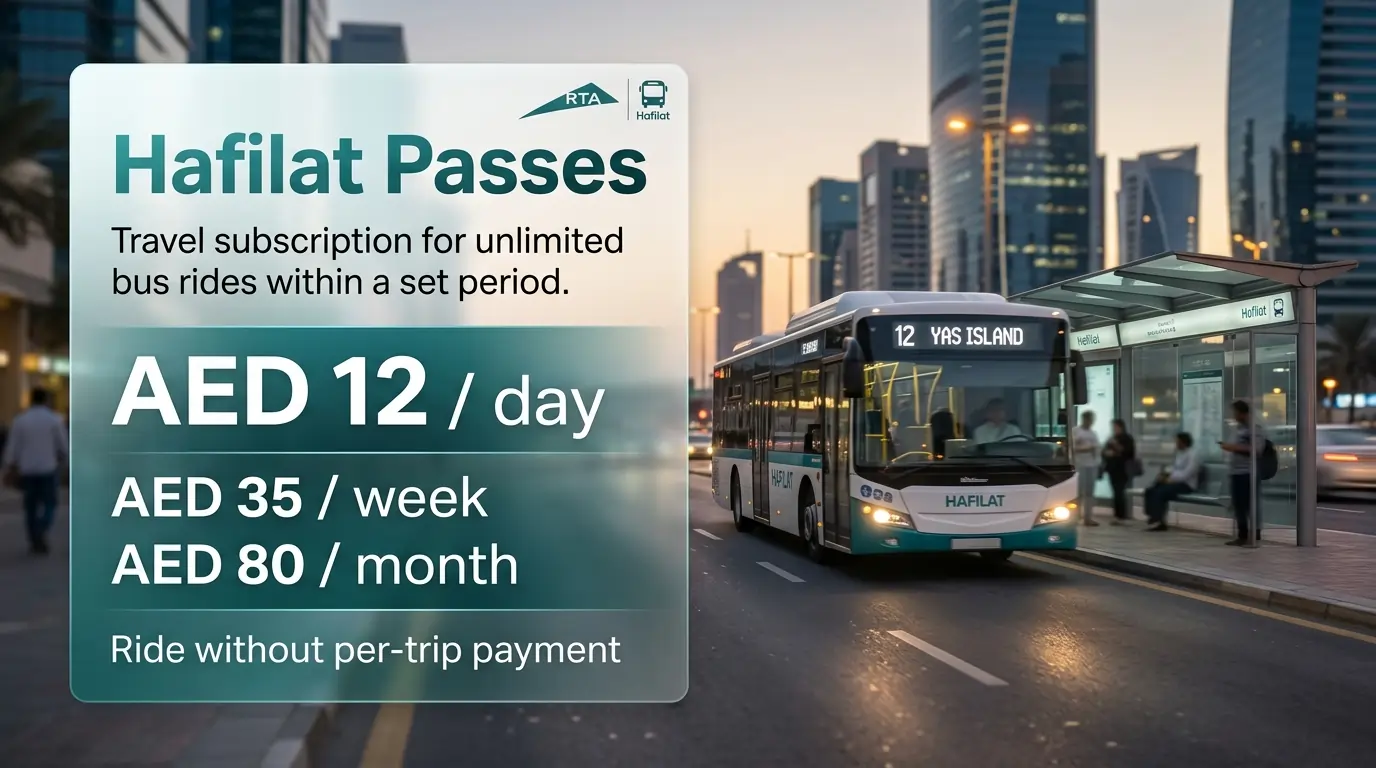
What are Hafilat Passes?
A Hafilat pass is a travel subscription that lets you ride public buses as many times as you want within a set period. You pay a fixed price, AED 12 for a day, AED 35 for a week, or AED 80 for a month, and then ride without paying per trip.
Each pass works for one person only. Passes cannot be shared or used by someone else.
Types of Hafilat Passes
There are 7 types of Hafilat passes available.
T-Purse (Pay-As-You-Go)
Flexible β pay per ride| Price | Varies based on travel distance |
| Validity | Until the balance expires (within 3 months) |
| Coverage | All Abu Dhabi city, regional, intercity (Al Ain/Dubai), and airport buses |
| Where to Buy | Online, TVM, authorized retailers, customer service centers |
| Required Documents | None |
| Best For | Flexible travelers who don’t ride often |
7-Day Pass
Weekly unlimited rides| Price | AED 30 β AED 35 |
| Validity | 7 consecutive days from first tap |
| Coverage | Unlimited rides on Abu Dhabi city buses |
| Where to Buy | TVM and official ticket counters |
| Required Documents | Valid Hafilat Card |
| Best For | Short-term visitors (maximizing savings) and weekly commuters (minimizing expense). |
30-Day Pass
Monthly unlimited rides| Price | AED 80 β AED 95 |
| Validity | 30 consecutive days from first tap |
| Coverage | Unlimited rides on Abu Dhabi city buses |
| Where to Buy | TVM and ticket counters |
| Required Documents | Valid Hafilat Card |
| Best For | The 30-day pass is the best choice for monthly commuters because it offers the lowest per-ride cost, unlimited access, and zero daily hassle. |
Daily Pass
One full day unlimited| Price | AED 12 |
| Validity | 1 calendar day (ends at midnight) |
| Coverage | Unlimited rides on Abu Dhabi city buses and public ferries |
| Where to Buy | TVM, online portal, app |
| Required Documents | Valid Hafilat Card |
| Best For | Best for tourists as it offers unlimited rides for a fixed, low price, and encourages spontaneous exploration. |
Student Pass
Annual or per-term| Price | AED 500 per year OR AED 120 per term |
| Validity | 1 year (365 days) or academic term |
| Coverage | Unlimited city and regional travel + 50% off intercity bus fares |
| Where to Buy | Customer Happiness Centers only |
| Required Documents | Emirates ID, valid student ID, student verification letter |
| Best For | Students who commute daily |
Senior Citizen Pass
Free β for 55 and above| Price | Free |
| Validity | 1 year (renewable annually) |
| Coverage | Unlimited city and regional travel + 50% off intercity buses |
| Where to Buy | Customer Happiness Centers only |
| Required Documents | Emirates ID, residence visa copy, lease or tenancy agreement |
| Best For | UAE residents 55+ get 50% or more off fares affordable, independent travel for seniors. |
People of Determination Pass
Free β with companion benefit| Price | Free |
| Validity | 1 year (renewable annually) |
| Coverage | Unlimited city and regional travel for cardholder + one companion free, 50% off intercity buses |
| Where to Buy | Customer Happiness Centers only |
| Required Documents | Emirates ID, government medical certificate, supporting medical report |
| Best For | Riders with approved disability status |
Silver Card (Pay-As-You-Go)
Zone-based fare| Price | Pay-as-you-go (AED 2 per zone) |
| Validity | Until balance expires (within 3 months) |
| Coverage | All Abu Dhabi city, regional, intercity, and airport buses |
| Where to Buy | Online, TVM, authorized retailers, and customer service centers |
| Required Documents | None |
| Best For | Occasional riders who don’t ride often |
Corporate Pass
For company employees| Price | Variable (set by agreement) |
| Validity | Custom |
| Coverage | Tailored for companies |
| Where to Buy | Contact ITC directly |
| Required Documents | Company trade license, employee list |
| Best For | Corporate Pass is designed for companies needing passes for employees who travel regularly for work, such as sales reps, field staff,or daily commuters.It allows to buy transit passes in bulk. |
Peak vs Off-Peak for Senior Pass
| Time | Discount |
|---|---|
| Off-peak hours | Free travel |
| Peak hours | 50% discount |
Peak hours are usually 7 AM to 9 AM and 5 PM to 7 PM.
Monthly Pass vs Pay-Per-Trip
| Trips/Month | Monthly Pass (AED 95) | Pay-Per-Trip | Best Option |
|---|---|---|---|
| 30 trips | AED 95 | AED 60-150 | Pass (if 15+ trips) |
| 20 trips | AED 95 | AED 40-100 | Pass (if 15+ trips) |
| 10 trips | AED 95 | AED 20-50 | Pay-per-trip |
Common Pass Issues
Is the monthly pass not working on the bus?
- Check if the pass is activated (first tap starts it)
- Verify route is covered (intercity routes excluded)
- Ensure the pass hasn’t expired
- Tap properly (in and out)
Balance deducted despite having a pass?
- You may have taken an excluded intercity route
- Your pass may have expired
- Visit a Customer Happiness Centre for transaction review
How to Buy a Pass
Same as recharging. Just choose “Pass” instead of “Add Credit” on:
Note: Student, senior, people of determination, and corporate passes must be purchased at customer happiness centers. Cannot buy them online.
Things to Know About Passes
| Rule | Details |
|---|---|
| Pass start time | Starts from the first tap, not from the purchase time |
| Pass expiration | Expires at midnight on the last day. No refunds. |
| Pass vs balance | Pass gets used first. Balance stays untouched until pass expires. |
| No sharing | Passes are for one person only. Sharing can result in fines. |
| Anonymous cards | Can buy T-Purse, 7-Day, 30-Day passes, Daily Pass, and Silver Card. No registration needed. |
| Personalized cards | Required for Student, Senior, POD, and Corporate passes. |
| Coverage | Works on all Hafilat buses across Abu Dhabi, Al Ain, and intercity routes. |
| Student term length | Varies by institution. Must be validated through the Hafilat portal or the university transport office. |
| Ferries | Daily Pass includes public ferries in Abu Dhabi. |
Need a personalized card for a student or senior pass? Check our guide on Hafilat card types and registration.
Comparison Table: All Recharge Methods and Passes
Here’s how all six methods compare. Use this to pick what works best for your situation.
| Method | Speed | Payment | Best For | Limitations |
|---|---|---|---|---|
| π» Darb Online Portal | 24-48 hours | Credit/Debit card (Visa, MasterCard, Mada) | Home or office users with a computer | Slow reflection time. Need account registration. |
| π² Darb Mobile App | 24-48 hours | Credit/Debit card, digital wallet | Regular commuters who want everything in one place | Slow reflection time. Need smartphone and account. |
| π³ Payit App | 24-48 hours | Payit wallet, linked cards | People already using Payit for bills | Slow reflection time. Only AED 10-100 per recharge. |
| π Ticket Vending Machines (TVM) | Immediate | Cash or card | People are already at the bus stations | Need to be at the bus station. Machines can be busy or out of order. |
| π’ Customer Happiness Centers | Immediate | Cash or card | Urgent recharge or card issues | Business hours only. Can get crowded. |
| π Retail Outlets (Lulu, SPAR, Co-op) | 2-4 hours | Cash or card | Combining recharge with shopping | Not instant. Some branches don’t offer service. |
| π΅ Banknote Reloader Machines (Bonus) | Immediate | Cash only | Cash users, 24/7 availability | Cash only. No change given. Recharge only, no new cards. |
| π« Hafilat Passes | Immediate (first tap) | Same as recharge | Daily, weekly, or monthly commuters | The pass expires at midnight. No refunds. Cannot be shared. |
Recharge Limits & Timeframes
Here’s a quick look at how much you can add and how long it takes.
| Minimum per recharge | AED 10 |
| Maximum per transaction (online/app) | AED 500 |
| Maximum per transaction (Payit/retail) | AED 100 |
| Maximum balance on one card | AED 150 |
- Online and app recharges take time because the system needs to sync across all buses and machines. That’s normal.
- Need the balance right now? Use a TVM, customer center, or BR machine.
- Planning ahead? The online tool or app works fine. Just do it a day or two before the card runs low.
- Balance expiry vs. card expiry: The money on your card expires after 3 months of no use. The plastic card itself lasts 5-16 years. Tap your card at least once every 3 months to keep your balance active.
Auto-Recharge Setup
Tired of remembering to add credit every time the card runs low? Set up auto-recharge. The system adds money automatically when the balance drops below a certain point.
How to enable in the Darb App
Open the Darb app. Log in.
Go to Settings. Look for “Auto-Recharge” or “Automatic Top-Up.”
Pick a trigger amount. AED 20 or AED 30 works well.
Choose how much to add. AED 50, AED 100, or AED 150.
Save a payment method. Credit card, debit card, or Payit.
Turn it on. Done. Now, when the balance drops below the trigger amount, the app adds credit by itself.
How to enable in the Payit App
Open the Payit app. Log in.
Go to the Hafilat Card section. Select the card.
Look for “Auto-Recharge” or “Scheduled Top-Up.”
Set the trigger amount and recharge amount.
Save payment method.
Hit Confirm.
Things to know about auto-recharge
- Keep enough funds in the linked card or wallet. If payment fails, auto-recharge won’t work.
- Check the balance once in a while to make sure it’s running smoothly.
- Can turn it off anytime in settings.
- No more standing at the bus stop with zero balance. No need to remember to top up. One less thing to worry about.
Troubleshooting
What to Do If Recharge Fails
Sometimes a recharge doesn’t go through. Don’t worry. Here’s what to check.
Check these first
Card number entered correctly? One wrong digit and it won’t work.
Does the payment method have enough money? Card declined? Not enough balance in your wallet?
Internet connection stable? A poor connection can interrupt the process.
Money deducted, but card not credited? If your bank account shows the transaction but the card balance hasn’t updated, the amount is in a pending state. Tap your card on any Ticket Vending Machine (TVM) at a bus station or Lulu Hypermarket. The machine will sync the pending transaction and update your balance in real time. No need to call customer service.
Still not working? Try these steps
Wait 10 minutes. Sometimes there’s a small delay.
Check the balance again on a TVM or bus reader. Online portals and apps might not show it right away.
Look for a confirmation message or email. If nothing came through, the recharge might not have gone through.
If the money was taken, but the balance didn’t show up: Save the receipt or screenshot of the transaction. Call 800 850. Tell them what happened. Have the card number and transaction details ready. Visit a Customer Happiness Center. Bring the card and proof of payment. Staff can check and fix it.
A few things to remember
- Online and app recharges take 24 to 48 hours. Don’t panic if it’s not showing after an hour.
- TVM and customer center recharges show up right away. If not, something’s wrong.
- Keep receipts until the balance shows up. Good to have proof.
- If your card is damaged or expired, recharging will not work.
Tips for Smooth Recharge
A few simple habits make recharging less of a hassle.
Recharge before the card hits zero
Don’t wait until the bus gate says “insufficient balance.” Top up when there’s still AED 5 or AED 10 left.Β
That small buffer ensures you always have enough for an emergency trip or a forgotten top-up. Keeping a low-balance alert in your mind saves time, avoids fines (for entry without fare), and keeps your travel smooth.
Save card details in the app
The Darb app and Payit app let you save payment info. Once saved, recharging takes a few taps. No need to pull out the card every time.
This is especially useful during peak hours, in bad weather, or when you’re running late. It also reduces the risk of losing your card since you’re handling it less often. A few minutes of setup saves you dozens of small hassles over time.”
Beware of fake recharge websites
Scammers create exact copies of the official Hafilat site and pay for top Google ad placement.Β
Always check the URL before entering any details. The only official website is https://hafilat.darb.aeΒ . If the payment gateway asks for an OTP in USD or any foreign currency, cancel immediately. Never click sponsored ads.
Keep a small cash cushion
Carry AED 20 to AED 50 in cash. If the app or website isn’t working, TVM or BR machines take cash and work right away.
That small AED 20β50 cushion acts like an emergency key: it guarantees you can always add balance and continue your journey, even when digital systems fail. It’s a tiny backup plan that saves you from being stranded, late, or embarrassed at the gate.
Use auto-recharge
Set it and forget it. The app adds money automatically when the balance runs low. Best thing for regular commuters.
Recharge before the holidays
Busy seasons like Eid or National Day mean more travelers. Do it a few days early to avoid delays.
Save receipts
Take a screenshot or keep the paper receipt. If something goes wrong, that’s proof the recharge happened.
Know a backup method
App not working? Try the website. Website down? Use a TVM or retail outlet. Having options saves time.
Check the balance after recharging
After 24 to 48 hours (or right away for TVM), tap the card on a bus reader. Make sure the new balance shows up.
Frequently Asked Questions
How do I recharge my Hafilat card online?
Go to hafilat.darb.ae. Log in. Go to recharge card. Enter the 16-digit card number. Pick an amount. Pay with a card. Done.
How long does online recharge take?
Balance shows up in 24 to 48 hours. Not instant. Plan ahead.
What is the minimum recharge amount?
AED 10. That’s the smallest amount you can add.
What is the maximum balance on one card?
AED 150. Can’t go over that.
Can I recharge with cash?
Yes. Use Ticket Vending Machines, Banknote Reloader machines, or Customer Happiness Centers. Cash works at all of them.
How do I know if a recharge website is fake?
The official Hafilat recharge website is only https://hafilat.darb.ae . Fake sites often:
- Appear as sponsored ads on Google
- Have slightly different URLs (e.g., hafilat-darb.com)
- Use fake payment gateways like “abudhabipay.com”
- Request OTPs in USD or other foreign currencies
If you are unsure, use the Darb app, Payit app, or recharge at a ticket vending machine instead.
Is there any service fee?
No. Recharging costs exactly what you add. No extra fees.
Why is my balance not showing after a recharge?
Online and app recharges take 24 to 48 hours. Wait a day. Still not there? Call 800 850.
Can I buy a weekly pass on an anonymous card?
Yes. Daily, weekly, and monthly passes work on anonymous cards. Only student and senior passes need a personalized card.
What happens to my balance if I buy a pass?
The balance stays on the card. The pass gets used first for all trips. Once the pass expires, the balance starts getting used.
Can I get a refund for an unused pass?
No. Passes are non-refundable.
How do I know when my pass expires?
Check the Darb app or tap the card on a TVM. Both show the expiry date.
Can I share my pass with someone else?
No. Passes are for one person only. Sharing can result in fines.
What are the peak hours for a senior pass?
Usually, 7 AM to 9 AM and 5 PM to 7 PM. Off-peak hours are free for seniors.
How to check if the recharge was successful?
Check the balance on a TVM or bus reader. Or look at transaction history in the Darb app.
Can I recharge someone else’s card?
Yes. Just need their 16-digit card number. For TVM or retail, you need the physical card.
What’s the fastest way to recharge?
Ticket vending machines, customer happiness centers, or banknote reloader machines. Balance shows up right away.
Can I recharge from outside the UAE?
The website and apps work from anywhere. But the balance won’t show until you tap the card on a bus reader in the UAE.
What if I enter the wrong card number?
The system will say, “Card not found.” Double-check the number and try again.
How to recharge the Hafilat monthly pass?
Monthly passes are bought the same way as adding credit. Choose the pass option instead of a regular amount.
Where can I recharge my Hafilat card?
Online: Darb portal, Darb app, Payit app. Offline: TVM, customer centers, retail outlets (Lulu, SPAR, Co-op), BR machines.
Conclusion
Recharging a Hafilat card doesn’t have to be complicated. Six methods exist online through the Darb portal, Darb mobile app, Payit app, ticket vending machines, Customer Happiness Centers, or retail outlets like Lulu and SPAR. Cash users also have Banknote Reloader machines as a bonus option.
In Abu Dhabi, where the Hafilat system runs most public buses, keeping the card topped up means no stress at the boarding gate.
For residents commuting daily in Abu Dhabi or Al Ain, the Darb app or auto-recharge works best. Students and visitors in Sharjah or other parts of the UAE can use the same methods: TVM at bus stations, cash at retail stores, or a quick online recharge from home.
Need the balance right away? Use a TVM or customer center. Planning ahead? The online or app works fine; just give it a day or two. Want to forget about recharging altogether? Turn on auto-recharge.