
Complete Guide — Abu Dhabi
Hafilat Balance Check: Complete Guide
On Hafilat Balance and Fines
7 Methods — Step by Step
There are seven ways for Hafilat balance check: online through the Darb portal, by sending an SMS to 3009, using the Darb mobile app, at a Ticket Vending Machine (TVM) at bus stations, on an onboard bus reader when boarding an intercity bus, or by visiting a customer service center or retail outlet like Lulu Hypermarket.
Each option is explained step by step below. A quick balance check before traveling takes less than a minute and helps avoid that moment when the card gets declined at the gate.
Pick the method that works best.
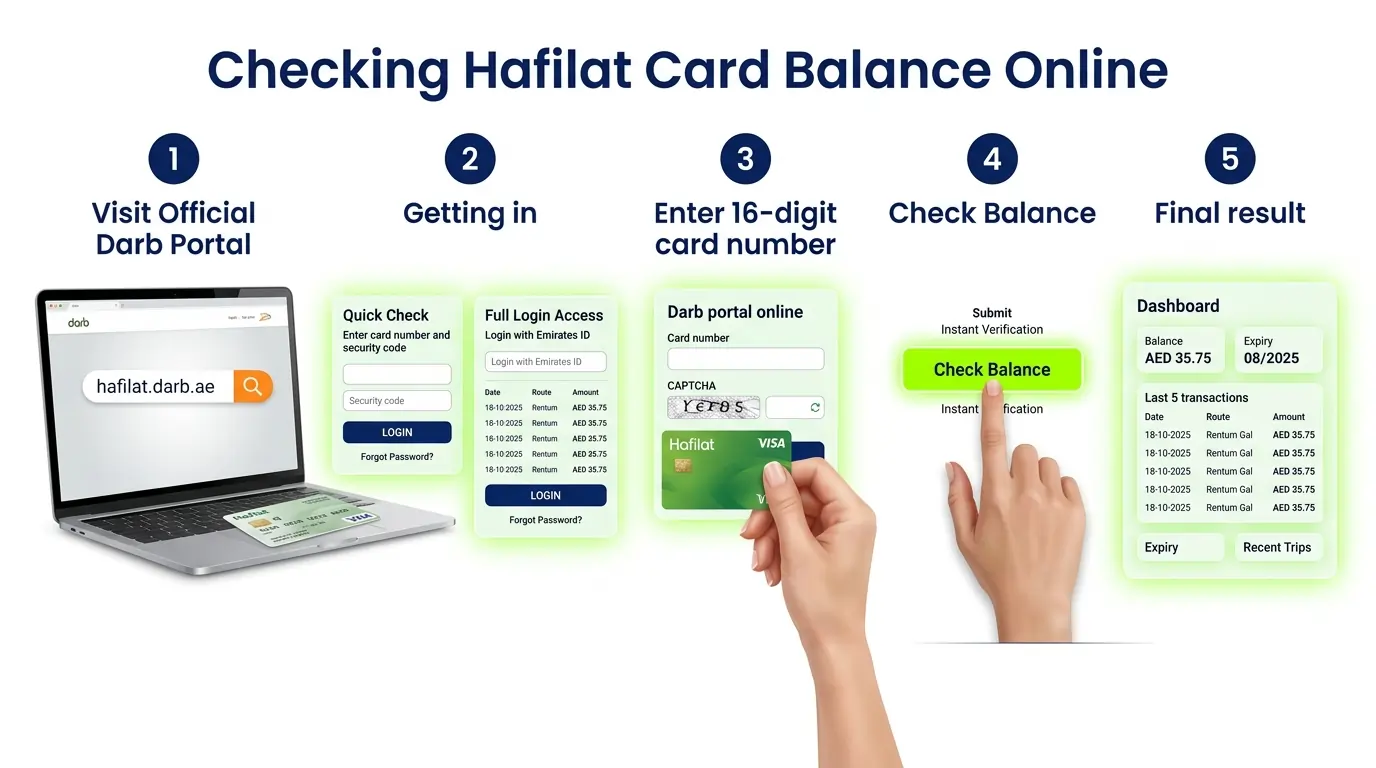
Hafilat Balance Check Online (Darb Portal)
Best for: Anyone with internet access who wants to check from a computer or phone

Open a browser and head to hafilat.darb.ae. That’s the official Darb portal.
There are two way to check your balance. Quick Check (No Login): On the homepage, click “Recharge Card” → Enter your card number → Enter the security code → Click Submit.
Full Access (Login Required): Click Login → Enter Emirates ID and password (or register if new) → View balance, expiry, and full transaction history
Grab your Hafilat card and flip it over. On the back, there’s a 16-digit serial number. Type it in exactly as it appears. No spaces until they have shown. Type the security code (CAPTCHA) shown on the screen into the box.
Then click Submit or Check Balance.
If a different system ever asks for 15 digits, try omitting the first two digits (e.g., “01” or “00”).
A few seconds later, the screen pulls up: • How much is left on the card (in AED) • When the card expires • The last five times the card was used
 A quick word of advice: Keep that 16-digit number somewhere safe; don’t share it with anyone or on a public platform. Before typing it anywhere, check that the website address starts with https and has a little padlock icon. That’s how you know it’s the official website.
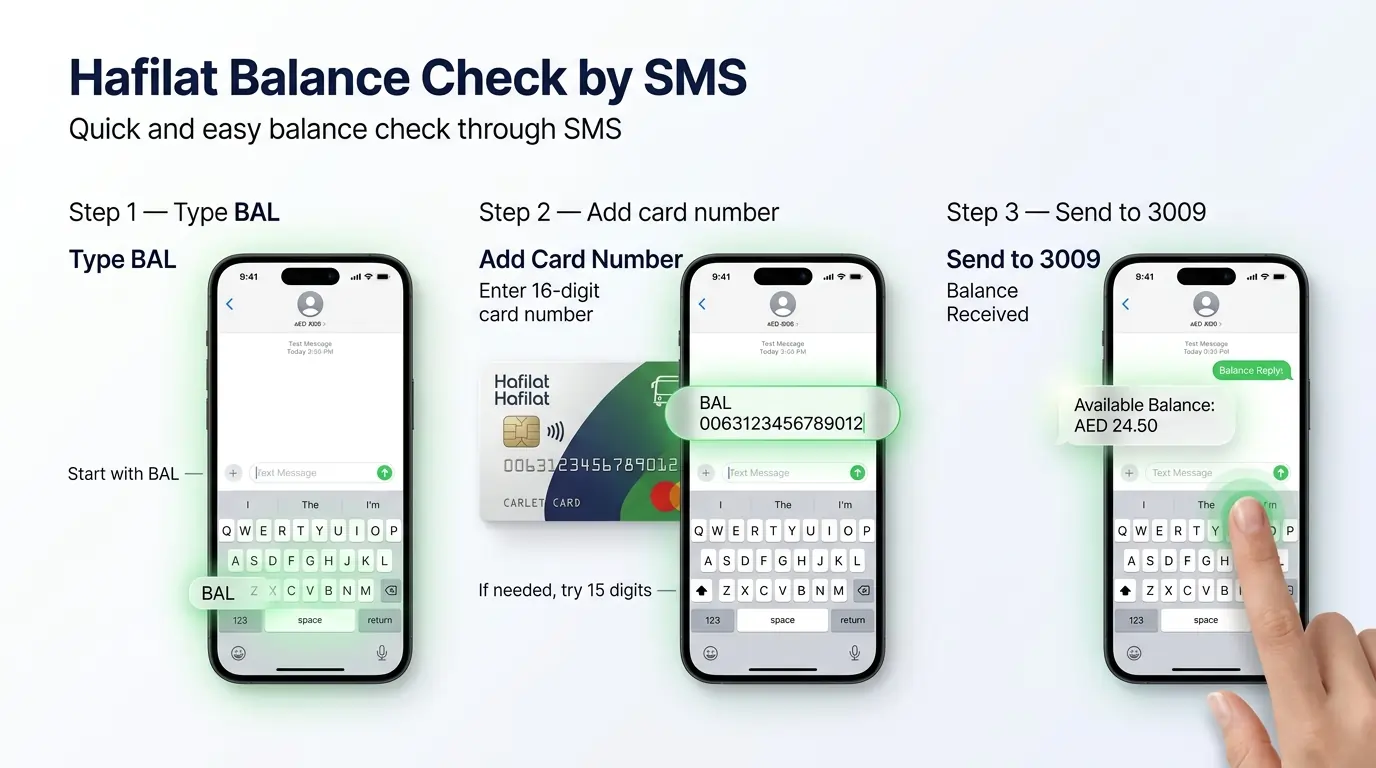
Hafilat Balance Check by SMS
Best for: Anyone without internet or who just wants a quick check without logging into anything
Hafilat Balance Check by SMS
Here’s how it works
Grab your phone. Open the messaging app like you’re about to text a friend.
Type BAL, hit the space bar once.
Then type the full 16-digit number from the back of your Hafilat card. Looks something like this: BAL 1234567890123456
Send it to 3009. In a few seconds, a reply pops up showing how much balance is left on the card.
Format
BAL 1234567890123456
Send to → 3009
A few things to keep in mind
- Make sure you’re sending from the mobile number that’s linked to the Hafilat card. If the number doesn’t match, the system won’t send back the balance.
- Also, standard SMS rates apply. Nothing extra from the transport system, just whatever the mobile provider charges for a text.
- Keep a screenshot of the reply if you need to remember the balance for later.
- If the SMS doesn’t arrive within a minute, try sending again; sometimes there’s a small network delay.
Method 3
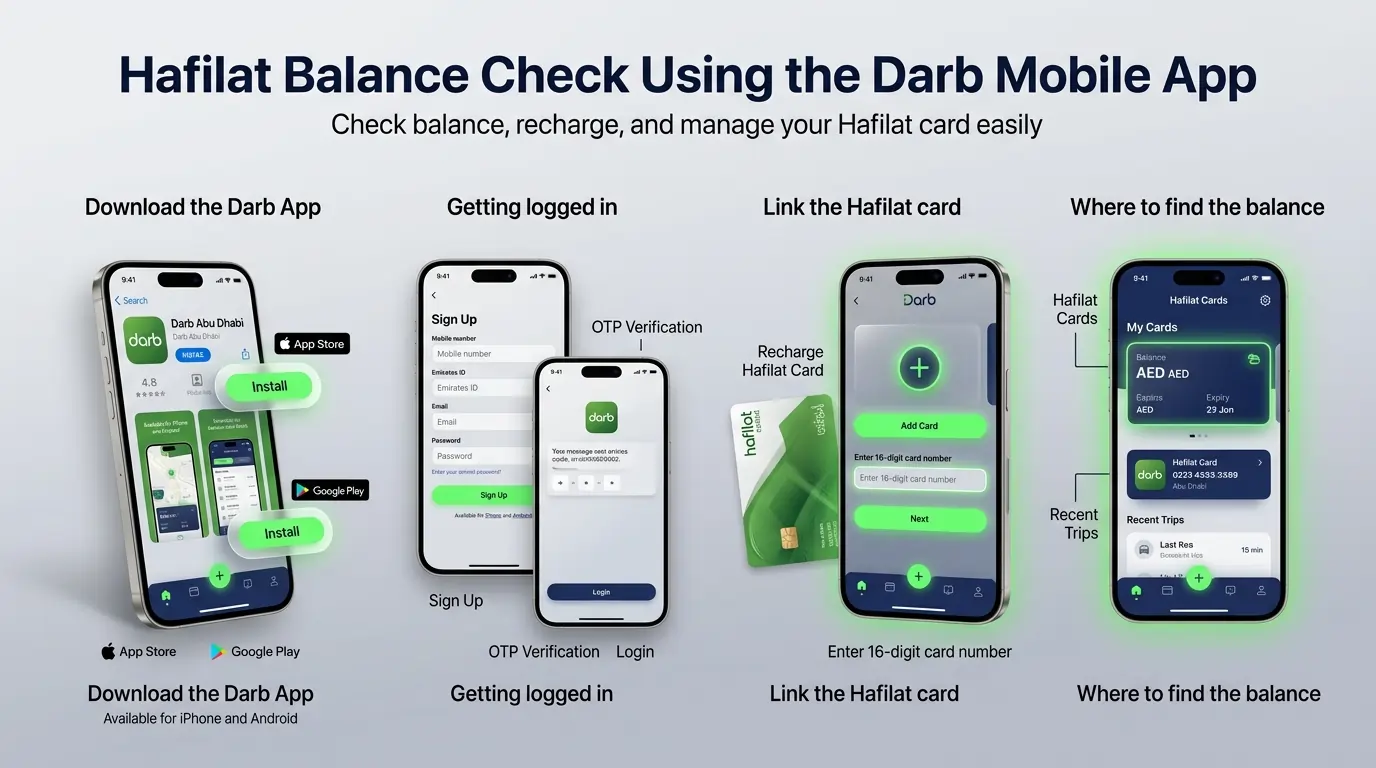
Hafilat Balance Check Using the Darb Mobile App
Best for: Regular commuters who want hafilat balance check, recharge, and trip history all in one place.
📲
Hafilat Balance Check Using the Darb Mobile App
iPhone users, open the App Store and search for “Darb Abu Dhabi.” Hit Get and let it download.
Android users can find it in the Google Play Store; do the same search and just tap Install.
Open the app. Tap Sign Up and put in a mobile number,Emirate Id and email, then make up a password.
An OTP code will come by text. Pop that in, and it’s done. If there’s already an account, just sign in.
On the main screen, look down at the bottom. There’s a little plus (+) icon. Tap it. A menu pops up; pick “Recharge Hafilat Card.” Grab the actual Hafilat card and flip it. Type in those 16 digits on the back. Exactly as they show. Then hit Add Card.
Back on the home screen, tap “Hafilat Cards” or “My Cards.” Choose the card that was just linked. Right there, the balance shows up. Also, the expiry date and the last few rides taken.
Other things the app can do
- Running low on credit? Tap Top Up and add money using a card or Payit wallet.
- Want to see where the card was used? Tap Transaction History.
- Don’t want to be caught with zero balance? Turn on notifications and get a text when it dips below AED 10.
A few things that help
- Staying logged in makes checking the balance a five-second job.
- Before heading out, snap a screenshot of the balance, especially if traveling on routes where the signal gets spotty.
- Sometimes the app and the bus reader show different numbers. A quick tap of the card on the reader fixes that.
- One account can hold more than one card. Good for keeping track of family members.
- Updating the app every now and then keeps everything running smoothly.
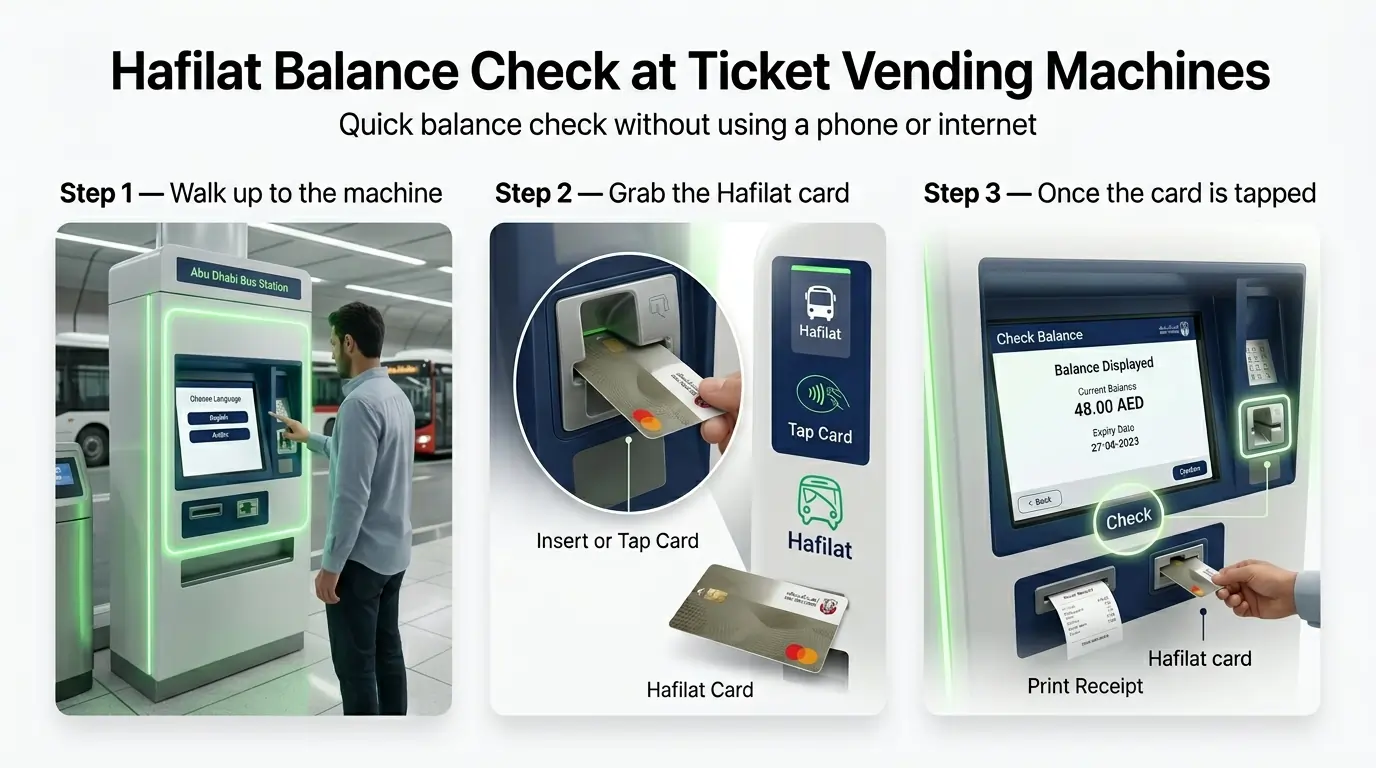
Hafilat Balance Check at Ticket Vending Machines
Best for: Anyone already at a bus station who wants to check their balance without using a phone or the internet

Hafilat Balance Check at Ticket Vending Machines
Where to find them
These machines are at most bus stations around Abu Dhabi and Al Ain. A few spots to keep in mind:
- Abu Dhabi Central Bus Station, the main one in the city
- Al Ain Bus Terminal, near where intercity buses leave from
- Mussafah Central Interchange
- Zayed Sports City Bus Terminal
- Mushrif Mall Interchange
- Khalifa City A Bus Station
- Al Wahda Mall Bus Station
- Baniyas East and West, those are the covered stops, not full stations
- Al Dhafra Region Bus Terminal, the one serving routes out to Ruwais and Delma Island
Every machine at these locations is approved by ITC. So, balance checks, topping up, getting a new card, or printing a receipt are all good to do there.
How to do it
Tap the screen or just press any button to keep it activated. It’ll ask for English or Arabic. Pick the desired language.
Some machines want it inserted into a slot. Others just need a tap on the screen near the Hafilat logo. Look closely, and it’ll show what to do.
The screen shows a menu. Find “Check Balance” and tap it. No money gets taken out; it just shows what’s left. The screen pops up with the balance. Sometimes, also the expiration date. That’s it.
If a paper copy is needed, tap “Print Receipt.” A little slip comes out. Good for keeping track. When finished, take the card back. Some machines hold onto it until the screen says to remove it. Don’t walk off without it.A few things that help
- Some machines need the card inserted with the chip facing down. Others just want a tap. If one way doesn’t work, try the other.
- If the screen freezes or doesn’t respond, there’s usually a Help button. Or just find another machine; there’s usually more than one.
- Keep the receipt if travel expenses need to be tracked. Sometimes the receipt didn’t come out. Machines run out of paper sometimes. Just jot down the balance on the phone or grab a receipt next time.
- No phone or internet needed. These machines run on their own.
- After tapping, wait for the beep before pulling the card away. Otherwise, it might not read properly.
- A little hand sanitizer after touching public screens never hurts.
Method 5
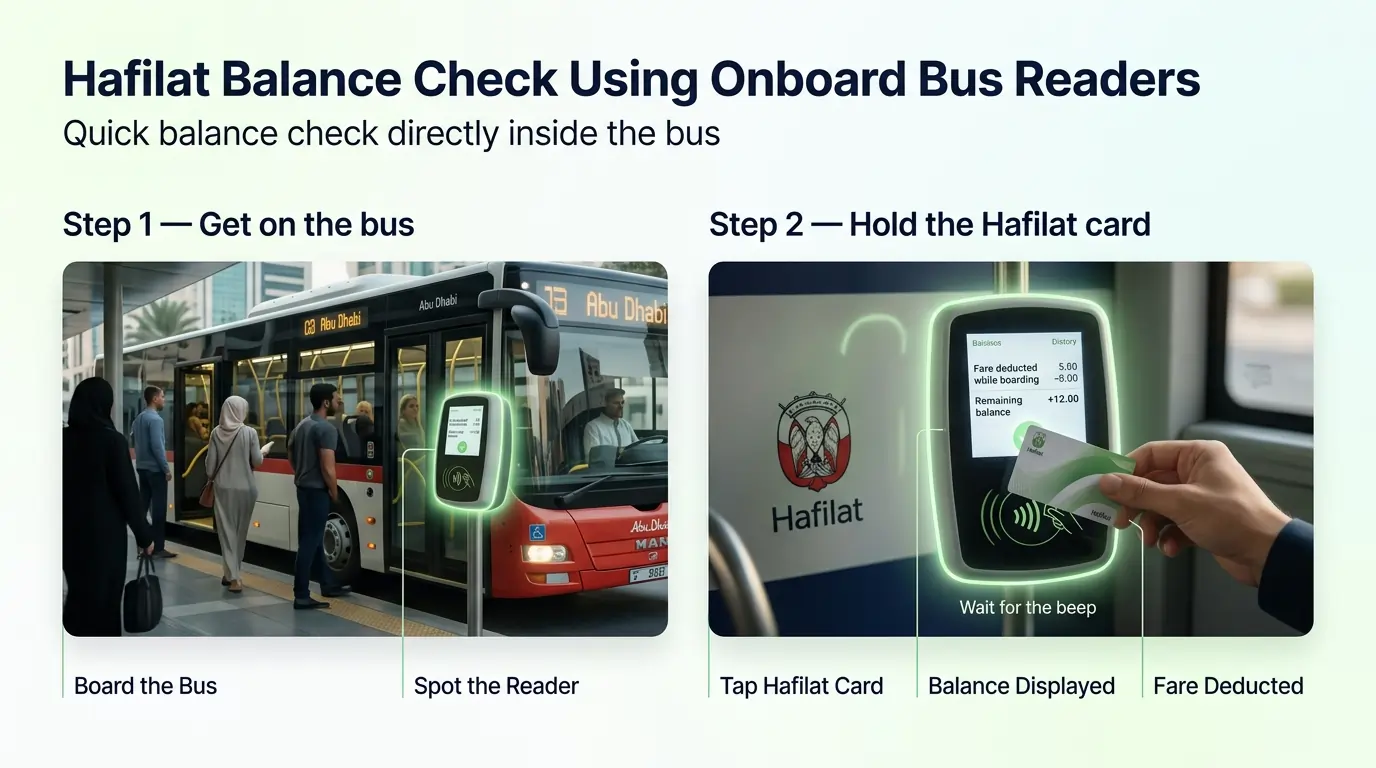
Hafilat Balance Check Using Onboard Bus Readers
Best for: Intercity travelers who want to check their balance right before a long trip
🚌
Hafilat Balance Check Using Onboard Bus Readers
Where to find them
Every intercity bus has one. Right by the front door, usually mounted on a pole or the wall. Looks like a small box with a screen and the Hafilat logo on it.
How to check
Spot the reader.
Place the Hafilat Card against where the Hafilat logo is. Wait for the beep. That’s the sign it worked. The screen lights up and shows fare deducted when boarding, and remaining balance when exiting. Takes maybe two seconds. That’s all. Grab a seat.
What it doesn’t do
Can’t put money on the card here. Just shows what’s left. No receipt either. Quick and simple.
A few things to know
- Wait for the beep before pulling the card away. Pull too soon, and it won’t read.
- If nothing happens, tap again. Sometimes the first tap doesn’t catch.
- The balance shows up on screen for just a few seconds. Got to look quickly.
- Good for checking before hopping on a long ride to Al Ain, Ruwais, and Delma Island. It’s better to know before the bus pulls off.
- Works the same way when getting off. Tap out, and the balance shows up again.
- If your balance is below AED 2.00 (the minimum fare for a local trip), the bus reader will show a red error message and will not allow you to board.
- No phone needed. No internet. No logging in. Just tap and go.
Hafilat Balance Check at Customer Service or Retail Outlets
Best for: Anyone who prefers talking to a real person or happens to be at a mall or hypermarket
Hafilat Balance Check at Customer Service or Retail Outlets
Where to go
🏛️ Customer Service Centers
These are the official ITC counters. Found at:
- Abu Dhabi Central Bus Station
- Al Ain Bus Terminal
- Abu Dhabi International Airport (Arrivals Hall)
- A few other transport hubs around the city
🛒 Retail Outlets
Some stores help with Hafilat stuff, too. Think:
- Lulu Hypermarket and Lulu Exchange
- SPAR
- Co-op
Not every branch has it. The bigger ones usually do have them.
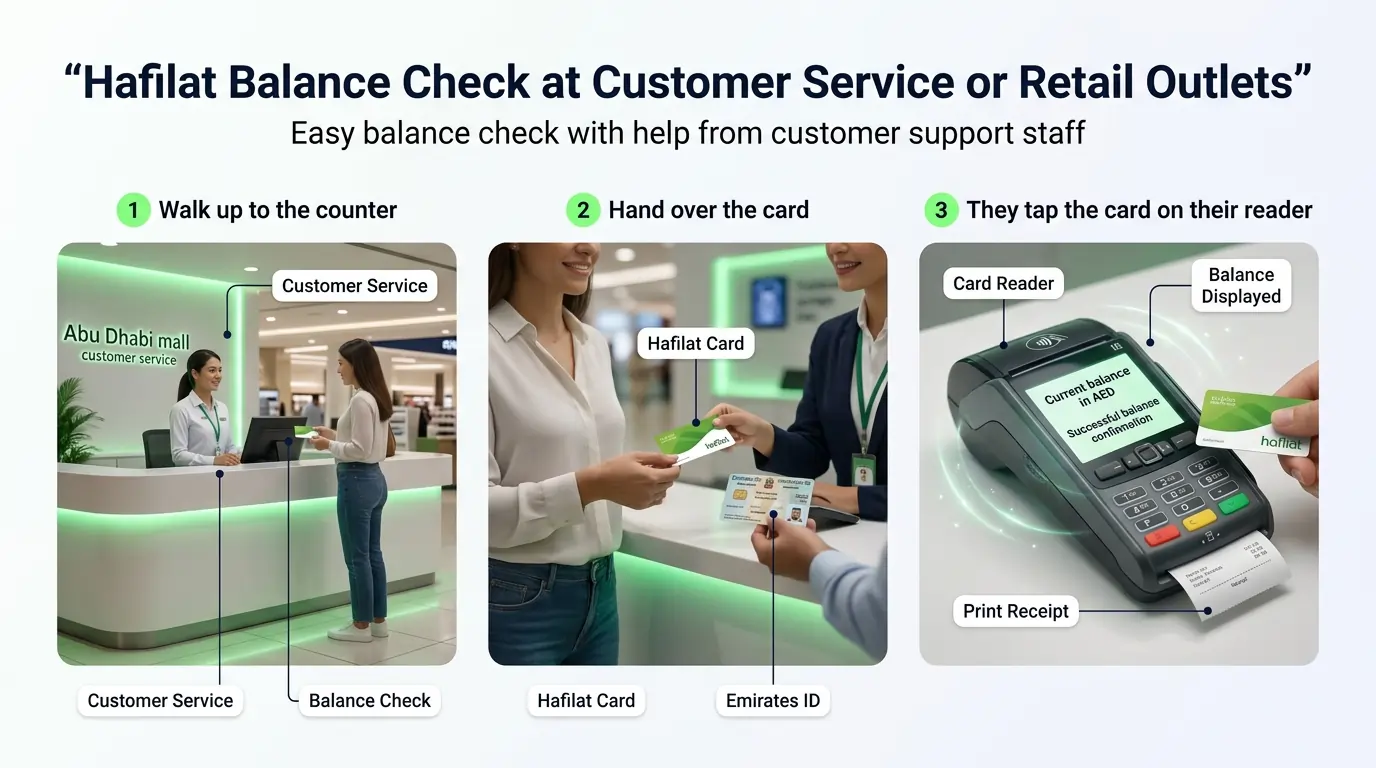
How to check
Say the balance on the Hafilat card needs checking.
If it’s a personalized card, it’s linked to the Emirates ID. They might ask to see the ID, too.
Takes a second. The balance shows up on their screen. Want a printed receipt? Just ask. Good for keeping track of travel expenses or filing away. Take the card and go.
Other things they can help with
- Adding credit to the card
- Getting a new Hafilat card
- Setting up a personalized card
- Answering questions about fines or lost cards
A few things to know
- Bring the actual card. They can’t look it up by number alone.
- For personalized cards, carry your Emirates ID. Some counters won’t help without it.
- Customer service counters get packed after work hours. Mornings are way quieter.
- Lost the card? These counters can move the balance to a new one.
Hafilat Balance Check Using Payit App
Best for: People who already use Payit for paying bills or sending money
Hafilat Balance Check Using Payit App
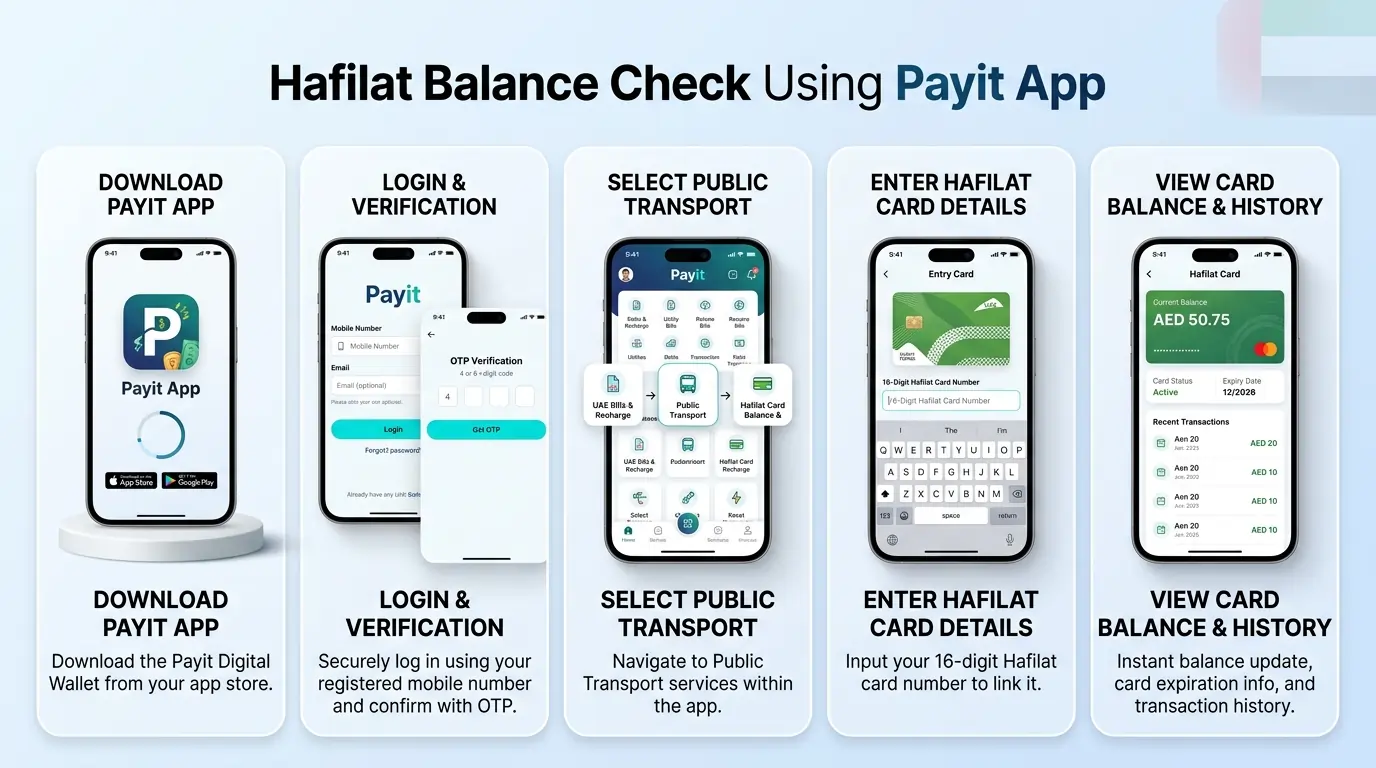
If Payit isn’t on the phone yet, grab it from the App Store or Google Play. Just search the Payit app and download it. Make sure it’s the latest version; older ones sometimes don’t have the Hafilat option.
Open the app. Already have an account? Just log in. New to Payit? Tap Sign Up. Enter a mobile number and email, and pick a password. An OTP comes by text. Type it in, and that’s it.
On the main screen, look for “UAE Bills & Recharge.” Tap that. Then select “Public Transport.” From there, tap “Hafilat Card Balance & Recharge.” That’s the spot.
First time using Hafilat in Payit? Tap “Add New Card.” Flip the Hafilat card over and type in the 16-digit number on the back. Tap Save. The card stays there for next time.
Tap on the card from the list. The balance pops up. Also shows the expiry date and recent top-ups. If the number looks off, tap Refresh. Sometimes it takes a second to catch up.
Other things Payit does with Hafilat
- Add credit to the card
- Pay any fines that show up
- Recharge other UAE transport cards too
A few things that help
- Stay logged in. Makes checking the balance a five-second thing.
- Already using Payit for DEWA or Du? Having Hafilat there keeps everything in one wallet.
- If a recent trip or top-up isn’t showing, tap Refresh or tap the card on a bus reader. That usually syncs it.
- Payit is useful for other stuff anyway: mobile top-ups, bills, and money transfers. Worth having.
Quick Comparison Table
| Method | Best For | Why Pick This One |
|---|---|---|
| Online Portal (Darb) | Seeing the trip history | Shows the last few trips. Helps track where money went. |
| SMS | Old phones or no data | Works on any phone. No app needed. |
| Darb App | Keeping track of family cards | Add multiple cards to one account. See everyone’s balance. |
| Payit App | Already using it for bills | Hafilat sits alongside DEWA, Du and mobile top-ups. |
| Ticket Vending Machine | Need a paper receipt | Prints a slip with the balance. Good for keeping records. |
| Onboard Bus Reader | Forgot to check before leaving | Tap when boarding. See the balance right there. |
| Customer Service or Retail | The card isn’t working right | Talk to someone. They can look into lost cards or wrong balances. |
Choosing The Best Methods for Hafilat Balance Check
With so many ways to check a Hafilat balance, picking the right one comes down to what’s convenient at the moment.
Which one to pick?
The Darb Mobile App works well for most people. Balance check, recharge, trip history, alerts, all in one spot. Open the app, tap the card, done.
SMS is the fallback when there’s no internet. TVM and bus readers work when already at a station. And customer service counters are there for anything that needs a real person to sort out.
Keep It Ready
Tips For Maintaining a Sufficient Hafilat Card Balance
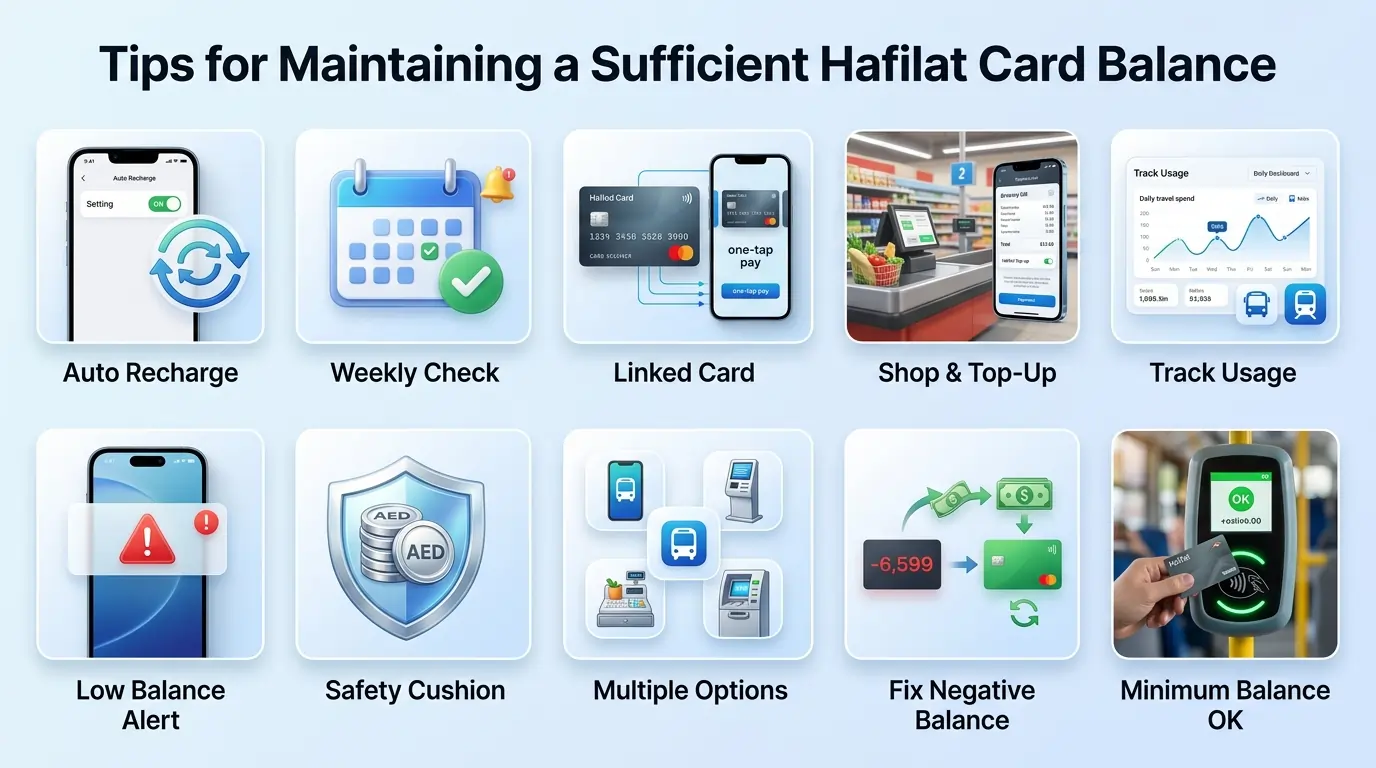
Running out of balance when trying to catch a bus is frustrating. A few simple habits keep the card ready to go.
Set up auto-recharge
In the Darb app or Payit app, turn on auto-recharge. Pick an amount and let the system add credit automatically when the balance runs low. One less thing to remember.
Keep a weekly reminder
Pick a day; Friday morning works for many people. Check the balance at the same time each week. Make it a habit instead of a scramble.
Link a card for quick top-ups
Save a debit or credit card in the Darb app or Payit. Recharging takes one tap. No need to pull out the card and type numbers every time.
Top up while running errands
At Lulu, SPAR, or Co-op? Add credit while there. Combines two tasks into one trip.
Watch travel patterns
Check the transaction history in the Darb app once in a while. Notice which days or routes cost more. Helps figure out how much to keep on the card.
Turn on low-balance alerts
In the Darb app, enable notifications. Get a text when the balance drops below a certain amount. No surprises at the gate.
Keep a safety cushion
AED 5 on the card is a good buffer. A single city trip costs AED 2 to AED 2.50, and the maximum fare is AED 5.
Recharge in larger amounts
Adding AED 100 or more at once means fewer recharge trips. Some retailers even have offers for bigger top-ups. If you ride the bus every day, weekly or monthly passes work out cheaper than paying per trip.
Check before intercity trips
Rides to Al Ain, Ruwais, or Delma Island cost more than city routes. Tap the card on a bus reader or check the bus fare, route, and schedule on the app before boarding.
Know all the recharge options
Know all the recharge options like the Darb app, Payit, TVMs, Lulu counters, and customer service centers. If one way isn’t working, there’s always another. To play safely, you need to know about card renewal and replacement to avoid any inconvenience.
Negative Balance?
If your balance shows negative after a trip, simply add credit (minimum AED 10) and tap your card on any ticket vending machine or bus reader. The amount will be deducted automatically, and your card will be ready for use again.
Keep a minimum of AED 5 on your card
A single city bus trip costs between AED 2 and AED 2.50. The airport bus costs AED 4. But the system does not know your destination when you tap in. So keeping AED 5 on your card covers the maximum possible fare for any city route (AED 5) and ensures you never get stranded mid-journey. Think of it as a small safety cushion. You will not be charged the full AED 5 for a short trip. That is just the maximum you could pay if you travel the entire route.
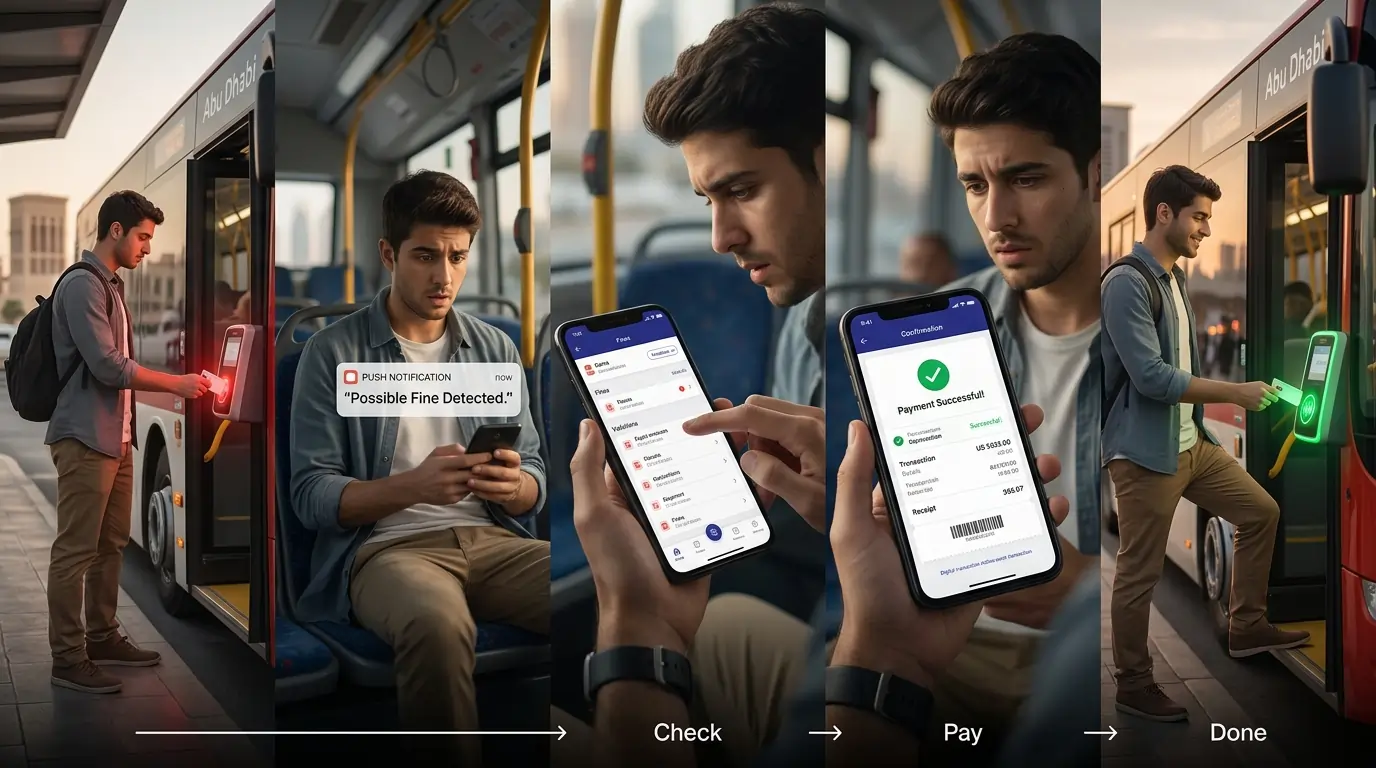
Important
Hafilat Fine Check
Hafilat isn’t just for paying bus fares. The system also keeps track of fines. These can happen for different reasons: traveling without tapping the card properly, using a concession card that doesn’t belong to you, or not having enough balance when boarding.
Checking for fines once in a while is worth doing. Unpaid fines can add up, and the card might even get blocked if left too long.

How to check Hafilat fines online
Head to the official Darbi website at darbi.itc.gov.ae.
to check and pay your fines online. Make sure you have your fine reference number ready to complete the process. You can also log in with your Emirates ID or enter your Hafilat card number in the Fine Inquiry section.
You can also check via the TAMM platform: Download the TAMM app or visit tamm.abudhabi. Log in with UAE Pass. Select “Drive & Transport” → “Traffic Violations and Fines” → Enter your fine reference number.
The screen shows:
- Any outstanding fines
- How much each one is
- When they were issued
- Deadline to pay

How to pay Hafilat fines
Once fines show up, here’s how to pay them:
Option 1: Darb Portal
- Go to hafilat.darb.ae
- Log in with Emirates ID or card number
- Find the Fine Payment section
- Select the fine to pay
- Choose a payment method (credit/debit card)
- Confirm and complete
- Save the confirmation receipt
Option 2: Darb App
- Open the Darb app
- Log in to the account
- Tap on “Fine Inquiry” or “Fine Payment.”
- Pick the fine that needs paying
- Follow the payment steps
- Screenshot or save the confirmation
Option 3: Payit App
- Open the Payit app
- Go to UAE Bills & Recharge
- Select Hafilat Card
- Tap on Fine Payment
- Choose the card and the fine
- Complete payment
- Keep the confirmation message
Option 4: Pay in person
- Visit a customer service counter at any bus station
- Bring the Hafilat card and Emirates ID
- Tell the staff which fine to pay
- Pay by card or cash
- Take the printed receipt before leaving
A quick word: Most payments go through right away. Always grab the receipt, online or paper. In case something goes wrong, that receipt is proof that the fine was paid.
 Common reasons fines happen
- Boarding the bus without tapping the card
- Getting off without tapping out
- Using someone else’s student or senior citizen card
- Not having enough balance when tapping
- Damaging or tampering with the card
 How to avoid Hafilat fines
- Always tap when getting on and off
- Keep enough balance, AED 5 or more
- Use the right card. Concession cards are for the person named on them
- Check the balance before long trips
- If the validator doesn’t beep, tap again or ask the driver
What happens if you don’t pay? Unpaid fines can lead to account flagging, service restrictions, residency renewal issues, and potential legal action.Fines must be paid within 30 days to avoid late payment fees or suspension of your Hafilat card.
Common Questions
Frequently Asked Questions
Q
How do I check my Hafilat card balance online?
Go to hafilat.darb.ae, log in with your Emirates ID, go to Recharge Card, enter the 16-digit card number, and the balance shows up.
Q
Can I check my Hafilat balance without internet?
Yes. Send an SMS with BAL followed by the card number to 3009. No internet needed. Standard SMS charges apply.
Q
Why are fines expensive?
A regular bus fare costs AED 2, but a Hafilat fine can be AED 200 or more. That’s a 100x difference. Abu Dhabi uses high fines as a strong deterrent to ensure everyone follows the rules.
Q
What’s the fastest way to check my balance?
The Darb app or Payit app shows it instantly if you’re already logged in. SMS takes about 30 seconds. Onboard bus readers show it right when tapping.
Q
Do I need to register my card to check the balance?
For online and app methods, yes. For SMS, TVM, bus readers, or customer service counters, no registration is needed.
Q
What’s the difference between the Darb app and the Payit app?
The Darb app is specifically for Hafilat and other Abu Dhabi transport services. Payit is a digital wallet that also includes Hafilat alongside bills, mobile top-ups, and money transfers.
Q
How much does it cost to check my balance?
Free. SMS may have standard charges from the mobile provider.
Q
What if the balance on the app doesn’t match what’s on the bus reader?
Tap the card on a bus validator or ticket machine. That usually syncs everything up.
Q
Can I check the balance for someone else’s card?
Yes. If using the Darb app, multiple cards can be added to one account. For SMS or TVM, you just need the card number or the physical card.
Q
What should I do if my card isn’t working?
Visit a customer service counter at a bus station. They can check what’s wrong and help fix it.
Q
How do I know if my card has any fines?
Check online through the Darb portal. Enter the card number or Emirates ID. Any fines will show up there.
Q
How to check the Hafilat card balance for students or seniors?
The same methods apply. Concessionary cards show the balance the same way: the Darb app, SMS, TVM, or customer service counters.
Q
What to do if the Hafilat card balance shows incorrectly?
Tap the card on a bus validator or TVM to sync the data. If it still looks wrong, visit a customer service counter. They can check the system and help sort it out.
Q
How to check the Hafilat card balance after a recharge?
After adding credit, tap the card on a bus reader or TVM to see the updated balance. The Darb app and Payit app also update within a few minutes.
Q
How to check the Hafilat card balance for intercity travel?
Tap the card on the onboard bus reader when boarding. The balance shows up right there. Good to check before heading to Al Ain, Ruwais, or Delma Island.
Q
How to check the expiry date of the Hafilat card?
In the Darb app or online portal, the expiry date shows right next to the balance. TVM and customer service counters also display it.
Q
What if a fine shows up by mistake?
Mistakes happen. Maybe the card didn’t read properly, or the system logged a trip twice, or you forgot to tap out your card.
Visit a customer service counter at a bus station. Bring the card and Emirates ID. Explain what happened. They can look into it and remove the fine if it was an error.
Conclusion
Checking a Hafilat balance takes less than a minute. Whether in Abu Dhabi, Sharjah, Al Ain, or anywhere across the UAE, there’s a method that works: the Darb app, SMS, TVM, or a quick tap on the bus reader.
Keeping a small buffer on the card, setting up alerts, and knowing a backup option make daily travel smoother. Fines are easier to handle when checked early.
A Hafilat card is meant to make trips simple. A quick balance check before stepping on the bus keeps it that way. Safe travels.